What is conversational scheduling? How AI booking links work
The Yoya TeamJun 29, 20267 min read

Booking a meeting still feels like paperwork. You open a link, squint at a grid of time slots, pick one, then fill in a few fields — name, email, and a "what's this about?" box most people leave blank. The meeting gets booked, but the person you're about to meet walks in knowing almost nothing about you.
Conversational scheduling fixes that. Instead of a form and a time grid, you book the meeting by having a short, natural conversation with an AI scheduling assistant. You say what you want in plain language — "can we talk Thursday about a partnership?" — and the assistant offers real open times, learns who you are and why you're meeting, and confirms with a calendar invite. The host gets a time and a brief on who's coming.
This guide explains what conversational scheduling is, how an AI booking link actually works, how a conversation can help guests book and give hosts more context, and where it fits.
| Traditional booking link | Conversational scheduling | |
|---|---|---|
| How you book | Pick a slot, fill a form | Have a short chat |
| What the host learns | Name, email, a skipped notes box | Who you are, why you're booking, what to discuss |
| Required questions | Often skipped | Asked naturally, can't be left blank |
| Feel | Transactional | Personal, like talking to an assistant |
| After booking | Calendar invite | Calendar invite plus a meeting brief |
What conversational scheduling actually means
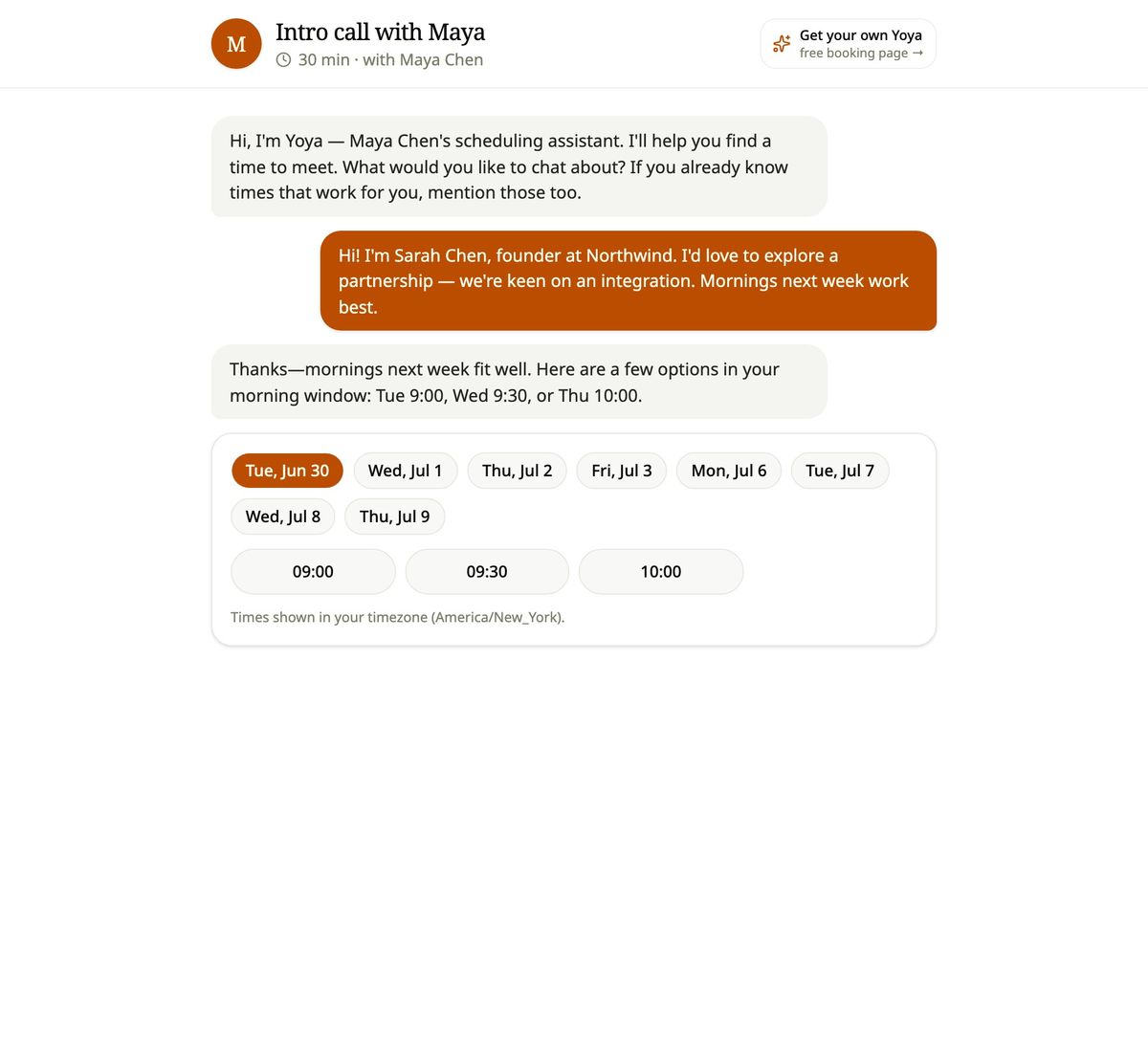
A conversational booking link is a single URL — like any scheduling link — but when a guest opens it, they don't see a form. They see a chat. An AI assistant greets them and asks what they'd like to meet about. With Yoya, that assistant has a name: Yoya introduces herself, asks a question or two, proposes times that fit the host's real availability, and books the meeting once the guest picks one.
The shift is small on the surface and large underneath. A form treats every guest the same and asks the same questions in the same order. A conversation adapts: it can ask a follow-up when something is unclear, accept a stated time preference up front, and skip questions it already has answers to. The output is the same calendar invite — but the path there is human.
The key idea: the booking link stops being a vending machine and starts being an assistant.
How an AI booking link works, step by step
Under the hood, a good conversational scheduler does five things in order:
- Greets and asks. The assistant opens with one question — what the meeting is about — instead of a wall of fields.
- Reads intent. From the guest's reply, it extracts the purpose and any stated time preference ("sometime next Tuesday afternoon").
- Offers real times. It checks the host's live availability — weekly hours, blocked dates, existing bookings, time zones — and surfaces only slots that are genuinely open, usually as tap-to-pick chips inside the chat.
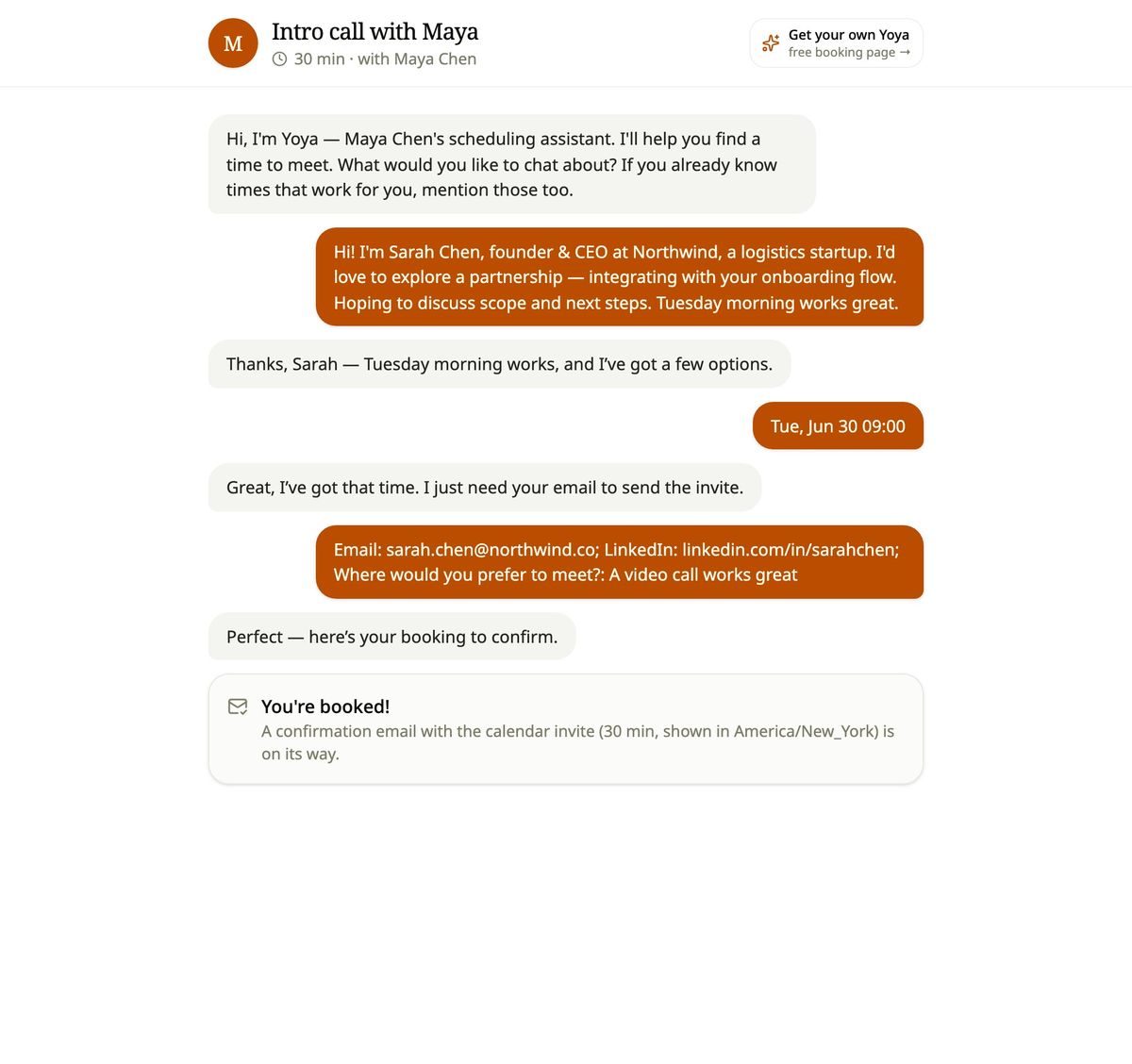
- Collects what's required. Before confirming, it makes sure it has the must-haves the host set — name, email, and anything else like a LinkedIn or a phone number — collected in a short contact form before the guest confirms.
- Confirms and briefs. It books the meeting, sends a calendar invite (and a video link, if the meeting is online), and hands the host a short brief: who the guest is, why they're booking, and what they want to discuss.
The guest experiences one smooth conversation. The host gets a clean booking on their calendar and context they never had to chase.
How conversation helps guests book
Forms leak people. Every extra field is another reason to bounce, and the highest-value meetings — investor intros, sales discovery, partnership calls — are exactly the ones where a cold, clerical form feels most out of place.
A conversation lowers the friction in three ways. It asks one thing at a time, so the guest never faces a daunting wall of inputs. It feels warm — talking to an assistant reads as "this person is organized and takes meetings seriously," which is a better first impression than a date picker. And it's flexible — a guest can lead with "I'm free Thursday or Friday morning" and the assistant runs with it, instead of forcing them to translate their preference into a grid.
The result is a booking flow that feels less like submitting a request and more like being helped.
The meeting brief: context before the call
This is the part that turns conversational scheduling from a nicer UI into a real advantage.
Booking forms can collect guest details, but the host may still need to read through the answers to prepare. When a guest books through a conversation, the host gets a brief — a short, structured summary of who the guest is, why they want to meet, and what they want to cover. It's the difference between walking into a call and asking "so… what did you want to chat about?" and walking in already knowing.
Yoya uses the conversation to learn what the guest wants to discuss. A short contact form collects their name, email, and any other details the host requires before the guest confirms the booking. The brief brings that information together for the host.
Conversational scheduling vs Calendly
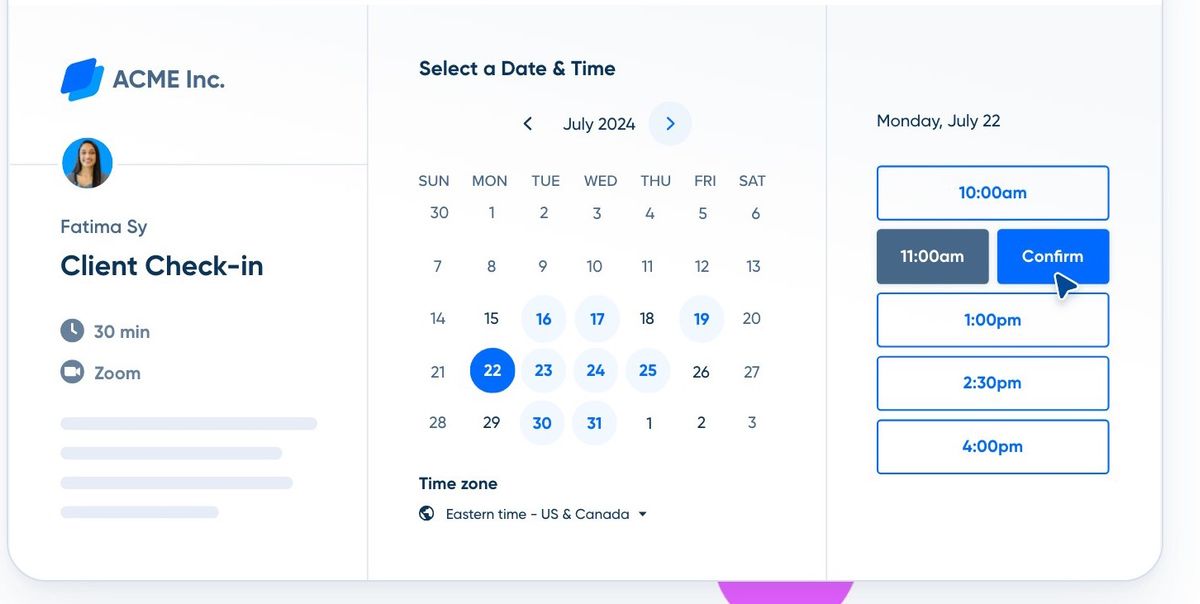
The standard Calendly booking page (source: calendly.com).
Calendly and similar tools solved the original problem — finding a mutually free time without the email ping-pong. That's genuinely useful, and conversational scheduling keeps it: real availability, time zones handled, no double-bookings.
What changes is everything around the time. A traditional link gives you a slot and a form. A conversational link gives you a slot and a brief with context about the guest. If your calendar is mostly transactional internal syncs, a grid is fine. If your calendar is full of people you haven't met yet — and the context of each meeting matters as much as the time — a conversation does more for you.
It's less "Calendly replacement" and more "Calendly, plus the assistant who would normally prep you for the meeting."
Where conversational scheduling fits best
- Founders taking investor, customer, and partner intro calls who want to show up prepared.
- Consultants and coaches running discovery calls that need goals, budget, and context before they say yes.
- Sales and BD teams that want the booking itself to qualify the lead and capture intent.
- Recruiters who want the LinkedIn and the "why" up front to screen smarter.
- Anyone whose booking link is a first impression and should feel personal, not procedural.
For purely internal, low-context scheduling, a plain grid is often enough. The value shows up when the people booking you are new and the reason for the meeting matters.
Is it reliable? Time zones, double-booking, and calendars
A natural worry: if an AI is doing the booking, can you trust the times? The answer comes down to architecture, not vibes. A well-built conversational scheduler never lets the assistant invent a time — it can only offer slots that exist in the host's real, recomputed availability, and it re-checks at the moment of confirmation so two guests can't grab the same slot. Time zones are converted for the guest automatically, and the confirmed meeting lands on the host's calendar with an invite for both sides.
In other words, the conversation is the friendly layer on top; the scheduling underneath is as strict as any booking tool.
Frequently asked questions
Is conversational scheduling the same as an AI chatbot?
Not quite. A generic chatbot answers questions. A conversational scheduler is purpose-built to book a meeting against real availability and capture a brief — the conversation always moves toward a confirmed time.
Does the guest have to type a lot?
No. The assistant asks one short question at a time, offers tappable time options, and only needs the essentials (like name and email). Most bookings take a handful of quick replies.
What does the host get?
A confirmed meeting on their calendar, a calendar invite (with a video link for online meetings), and a brief on who's coming and why — instead of the booking details alone.
Can it handle time zones and avoid double-bookings?
Yes. Times are shown in the guest's time zone, and the booking is validated against live availability at confirmation, so the same slot can't be taken twice.
How is this different from a Typeform plus Calendly?
Those bolt a form onto a grid — two separate steps the guest must complete. Conversational scheduling is one flow that does both at once, and it produces a structured brief instead of raw form answers.
The takeaway
Conversational scheduling is the booking link, grown up. It keeps everything a scheduling tool already does well — real availability, time zones, calendar invites — and adds a conversation that learns who's coming and why, and hands you a brief before the call.
If your meetings are with people worth preparing for, that's the difference between booking a time and being ready for it.
Meet Yoya — your AI scheduling assistant. Share one link, and Yoya books your meetings through a conversation, then briefs you before every call.