How to prepare for a meeting before it starts
The Yoya TeamJun 24, 2026Updated Jun 29, 20268 min read

You know the moment. The call connects, you smile, and then comes the line that quietly burns the first ten minutes of every meeting: "So… what did you want to chat about?"
You had a name. You had an email. Maybe a one-line subject from the calendar invite. Everything else — who this person actually is, why they reached out, what they're hoping you'll solve — you're now reconstructing live, on the clock, while trying to look like you've got it all handled.
It's not your fault. Most booking links hand you a time and nothing else. The fix isn't more discipline — it's a booking flow that captures who's coming, why, and what they want to discuss before the call, and hands you a brief so you're prepared the moment you say hello.
This piece is about how to stop walking in blind: a few practical habits that genuinely help, and then the part most people skip — automating the hardest step, which is gathering context in the first place.
Walking in blind vs walking in briefed
The difference between a cold call and a prepared one usually comes down to a handful of facts you either had or didn't. Here's what a typical form-based booking gives you versus what a conversational booking brief gives you.
| What you get before the call | Form-based booking link | Conversational booking brief |
|---|---|---|
| Name | Yes | Yes |
| Yes | Yes | |
| Who they are (role, company, context) | Rarely — optional field, usually skipped | Captured in plain language |
| Why they're booking | Blank "notes" box, often empty | Asked directly, answered conversationally |
| What they want to discuss | Almost never | The core of the brief |
| Required details (LinkedIn, phone) | Easy to skip | Collected before booking confirms |
| Your prep time before the call | 0 minutes — you wing it | Already done — you read the brief |
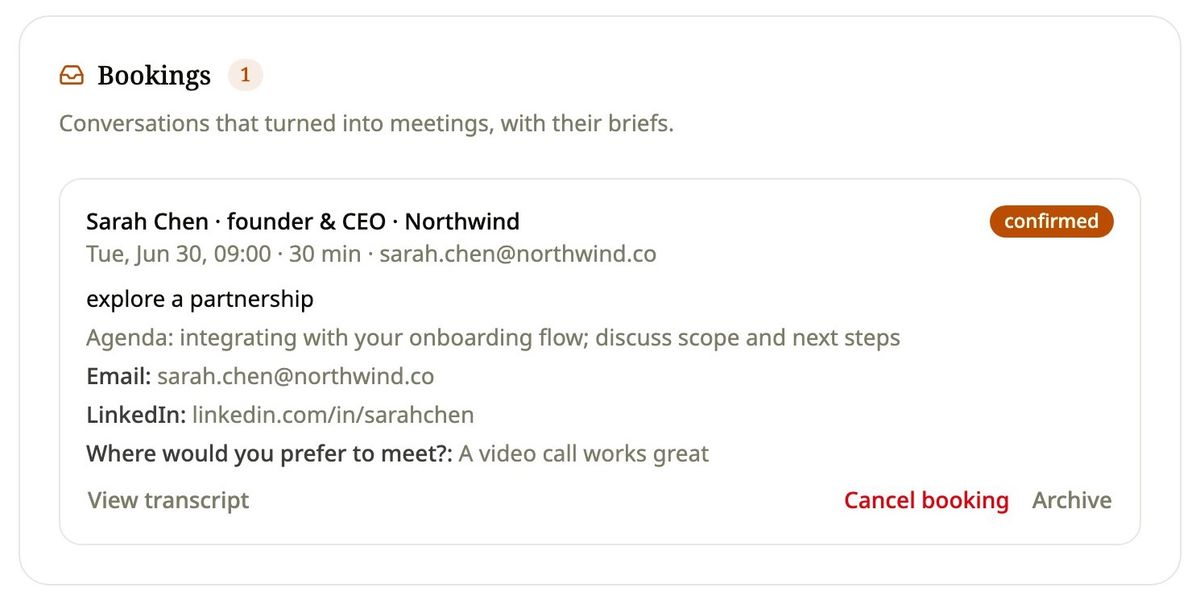
The left column is why so many calls open with archaeology. The right column is what it feels like to start a meeting already knowing where it's going. The good news: getting from left to right doesn't require you to chase anyone down.
Why the first ten minutes keep disappearing
Cold openings aren't a small-talk problem. They're an information problem. When you don't know why someone booked, you have to spend live meeting time excavating context that should have arrived ahead of you — and you usually surface it awkwardly, with a string of "and remind me, what's your role?" questions that make you look less prepared than you are.
Research on meetings consistently finds that a large share of meeting time is considered unproductive, and one of the most-cited culprits is meetings that begin without a clear, shared purpose. According to Harvard Business Review, executives rate over two-thirds of meetings as failing to achieve their goals — and ambiguity about purpose is a recurring theme. You can't run a focused conversation if the first third of it is spent agreeing on what the conversation is.
The deeper cost is reputational. When you open with "what did you want to chat about?", the guest hears something specific: you didn't prepare for me. Even if you're brilliant for the other forty minutes, the first impression is already set. Briefed hosts flip that signal entirely. Opening with "I saw you're scaling your support team and want to talk integrations — let's get into it" tells the guest they were taken seriously before they even showed up. Same meeting, completely different footing.
A few habits that actually help you prepare
Before we get to automation, the boring truth is that good meeting prep is mostly a few repeatable habits. None of these are revolutionary, but doing them consistently separates the people who feel calm in meetings from the people who feel ambushed.
- Read the brief, not just the calendar. Two minutes before the call, look past the time slot. Who is this, why are they here, what's the one outcome they want? If that information exists somewhere, read it. If it doesn't, that's the real problem to solve.
- Write your one question. Walk in with a single, specific question you want answered by the end. It anchors the conversation and stops it from drifting into a general catch-up.
- Decide your one outcome. What does a good result look like — a next step booked, a decision made, a problem scoped? Knowing this keeps you steering instead of reacting.
- Skim their footprint. A quick look at a LinkedIn profile or company site turns "nice to meet you" into "congrats on the new round." Context compounds.
- Leave a landing zone. Block two minutes after to jot what was agreed while it's fresh. Prep and follow-up are the same muscle.
Here's the catch: four of these five habits depend entirely on step one. If nobody captured who's coming and why, there's nothing to read, and the rest collapses into guesswork. So the highest-leverage move isn't being more disciplined about prep — it's making sure the context exists at all. That's the part worth automating. If you want the bigger picture on this shift, conversational scheduling explains why booking is becoming a conversation instead of a form.
How a conversational booking link gathers the brief for you
This is where the booking link earns its keep. Instead of dropping the guest onto a grid of time slots and an optional notes box they'll skip, a conversational link lets them book by chatting — and that chat is also where the context gets captured, naturally, without feeling like an interrogation.
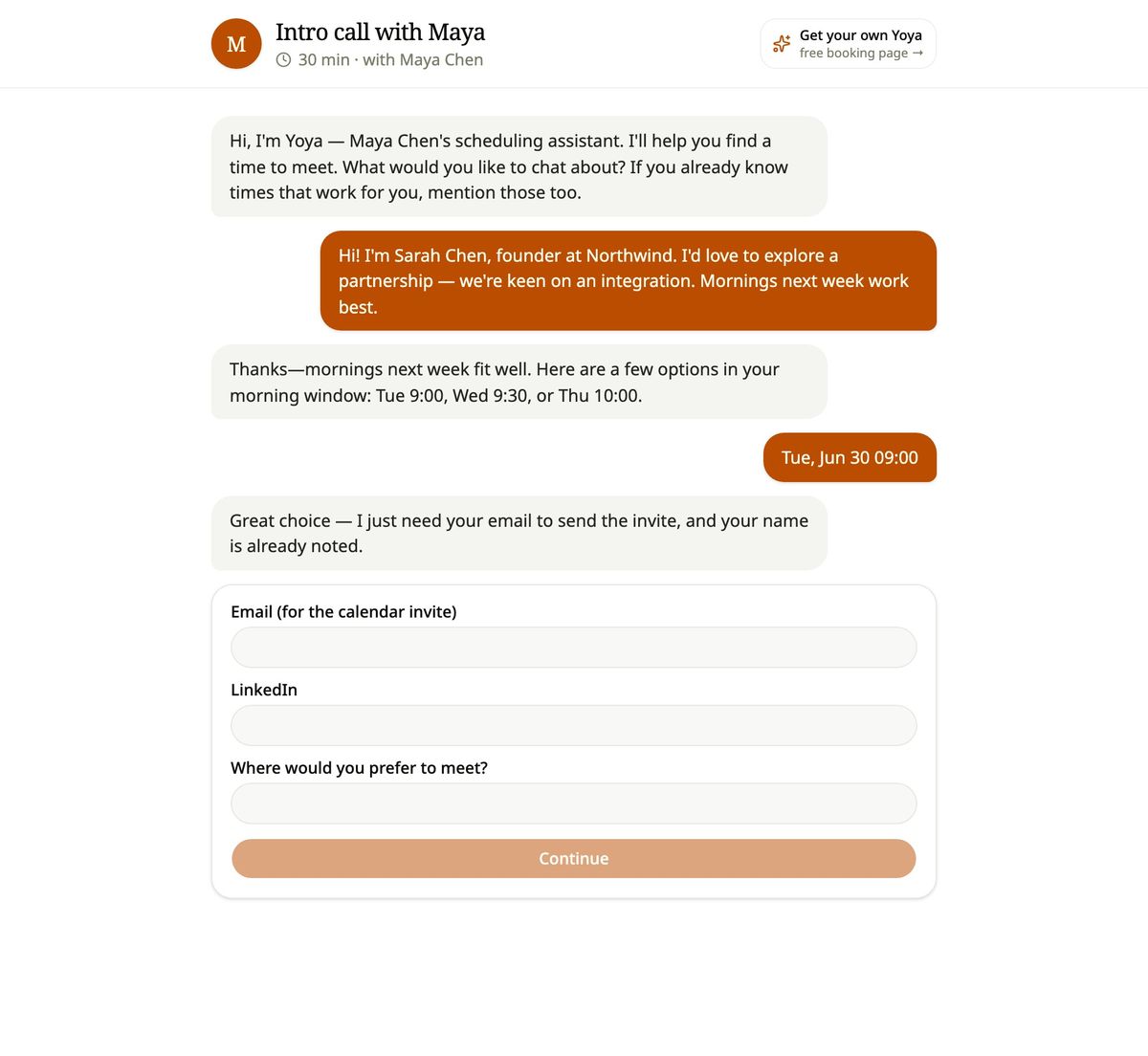
Yoya is an AI scheduling assistant built around exactly this. A guest opens your link and talks to Yoya, a named assistant, in plain language. She offers real open times from your live availability — weekly hours, blocked dates, time zones, no double-booking — so the scheduling itself stays accurate. But while she's finding a time, she's also doing the part you used to do live: asking who the guest is, why they're booking, and what they want to discuss. The answers become a meeting brief.
Because it's a conversation, the things you actually need don't get skipped. If you require a LinkedIn URL or a phone number, Yoya asks for them inside the chat before the booking confirms — no empty fields, no "I'll send it later" that never arrives. When the time is set, she sends a calendar invite with an automatic Google Meet link for online meetings, or asks for a preferred location for in-person ones.
Then the important handoff happens: before the call, you get the brief. Not a name and an email — a short, readable summary of who's coming and what they want. It's the difference between an intake form that nobody fills out and a real conversation that does the gathering for you. (If you've felt that intake forms have quietly stopped working, the intake form is dead makes the case in full.)
What it feels like on both sides
For the guest, booking stops feeling like data entry. They're not decoding a grid or wondering whether the "notes" field matters. They answer a few friendly questions, get a time that genuinely works, and walk away feeling like someone's actually expecting them. That alone raises the quality of who shows up — people who can articulate why they're booking tend to be the people worth meeting.
For you, the host, the change is quieter but bigger. You stop opening calls with excavation. You walk in already knowing the shape of the conversation, which means you spend your energy on the actual work instead of the warm-up. Over a week of back-to-back 1:1s, reclaiming the first ten minutes of each one adds up to real hours — and to a string of guests who all felt genuinely seen.
It's the closest thing to having a personal assistant who takes your meeting requests, screens them, and preps you before each call — without hiring one. Founders especially feel this fast, which is why a Calendly alternative for founders keeps coming up: the time and attention you save scales directly with how many people you meet. You don't just get a time on the calendar. You get a qualified, briefed guest.
Frequently asked questions
What exactly is an AI meeting brief?
It's a short summary of who your guest is, why they booked, and what they want to discuss — captured during booking and handed to you before the call. Instead of a name and an email, you get context you can actually prepare with.
How is this different from the notes field on a normal booking link?
A notes field is optional, so most guests skip it. A conversational booking link asks the questions directly in a chat, so the answers actually get captured. Required details can't be skipped either — Yoya collects them before the booking confirms.
Does the guest have to do extra work to give me a brief?
No — it's less work, not more. They answer a few natural questions inside the same chat where they pick a time. There's no separate form to fill out, and most guests find it faster than decoding a grid of slots.
Will it still respect my real availability?
Yes. Yoya only offers times from your live calendar — weekly hours, blocked dates, and time zones — and never double-books. The brief is added on top of accurate scheduling, not instead of it.
Can I require specific information, like a LinkedIn or phone number?
Yes. You define the required fields, and Yoya asks for them inside the conversation before the booking is confirmed, so they can't be left blank.
How do I get the brief before the call?
It's handed to you ahead of the meeting, alongside the calendar invite. By the time the call starts, you've already read who's coming and what they want — no live archaeology required.
Never open with "so… what did you want to chat about?" again
Walking in cold isn't a discipline problem. It's a missing-context problem — and the most reliable way to fix it is to gather the context automatically, at the exact moment someone books. Do that, and every meeting prep habit that follows actually has something to work with.
That's the whole idea behind Yoya: a booking link that chats with your guests, captures the who, why, and what, and hands you a brief before the call so you're ready before you say hello. Stop reconstructing context live and start showing up prepared — Meet Yoya.