Collect meeting details through a conversation
The Yoya TeamJun 22, 2026Updated Jun 29, 20267 min read

You know the box. It sits at the bottom of your booking page, just under the time slots: "Anything you'd like to share before our call?" A polite little intake form, waiting to be useful. And almost every time, it isn't. The guest leaves it blank, or types "looking forward to it!", and you walk into the meeting knowing a name and an email and absolutely nothing else.
We've been told the fix is a better form — a Typeform with nicer transitions, a Google Form with a few sharp questions, three required fields instead of one. But the format is the problem, not the fields. The intake form is the wrong tool for collecting context before a meeting; a conversation gets you more, gets you it more often, and can be required-by-design so the essentials are never skipped.
This isn't an argument that forms are useless. It's an argument that for the specific job of prepping a 1:1 — understanding who's coming, why, and what they actually want — asking feels like paperwork, and a chat feels like being welcomed.
Why the booking-page form quietly fails
A form is a one-shot, take-it-or-leave-it transaction. It shows you every field at once, in the moment you least want to do homework — right after you've finally found a time that works. Your guest just wants the slot confirmed. The "notes" box reads as optional friction, so it gets treated as optional. Skipped, or filled with a pleasantry.
When people do fill it in, the answers are thin, because a form can't react. Ask "What do you want to discuss?" and you get "pricing." A good assistant would hear "pricing" and ask the obvious follow-up — pricing for what, what size team, what timeline? The form just records "pricing" and moves on. It can't tell a one-word answer from a complete one, so it accepts both.
And the more you ask, the worse it gets. Form-conversion research is blunt on this point: every additional field costs you completions. HubSpot's own testing famously found that trimming a form from four fields to three lifted conversions by around 50%, and a widely cited Imagescape case study saw a jump of roughly 120% when a form went from eleven fields down to four — numbers documented in HubSpot's writeup on form length. So you're trapped: ask for what you need and fewer people finish; ask for less and you learn less. The form makes context and completion enemies. A good intake should make them allies.
A conversation collects better context
Swap the form for a short chat and the dynamics flip. Instead of a wall of fields, your guest gets one warm question at a time, in plain language, from a named assistant. It doesn't feel like a gate before the booking — it feels like the booking.
The real unlock is that a conversation adapts. Say "I want to talk about pricing" and a capable AI assistant follows the thread: how big is your team, are you switching from another tool, what's your timeline? Each answer shapes the next question, the way a sharp human assistant would on an intake call. You're not filling boxes; you're being understood. That's the whole premise of conversational scheduling — the booking itself becomes the intake.
Tone matters more than people admit. "Why are you booking?" in a form field feels like an interrogation. The same question, asked conversationally — "What are you hoping to get out of our time?" — feels like genuine interest. Same information, completely different willingness to answer. People give more to a conversation because a conversation gives something back: a sense that someone is actually listening and will be ready for them.
Required-by-design beats the asterisk
Here's the move that quietly fixes the worst part of forms. On a form, a required field is a wall — a red asterisk and an error message that stops the guest until they comply. It works, technically, but it converts your warm welcome into a bouncer at the door. People resent it, and resentment shows up as garbage input: a fake phone number, "n/a" in the company box, just enough to get past the gate.
In a chat, "required" works differently. If you tell Yoya that you always need a LinkedIn profile or a phone number before a sales call, she simply asks for it — naturally, in the flow of the conversation — and won't wrap up the booking until she has it. Nothing essential gets skipped, but nobody hits a wall. It's required by design, not required by friction.
That distinction is the whole game. The form's only enforcement tool is the gate, and gates create the exact behavior you don't want. A conversation can insist on what matters while still feeling like a welcome rather than a checkpoint. You get your non-negotiables every single time, and your guest never feels frisked on the way in.
What the host actually receives
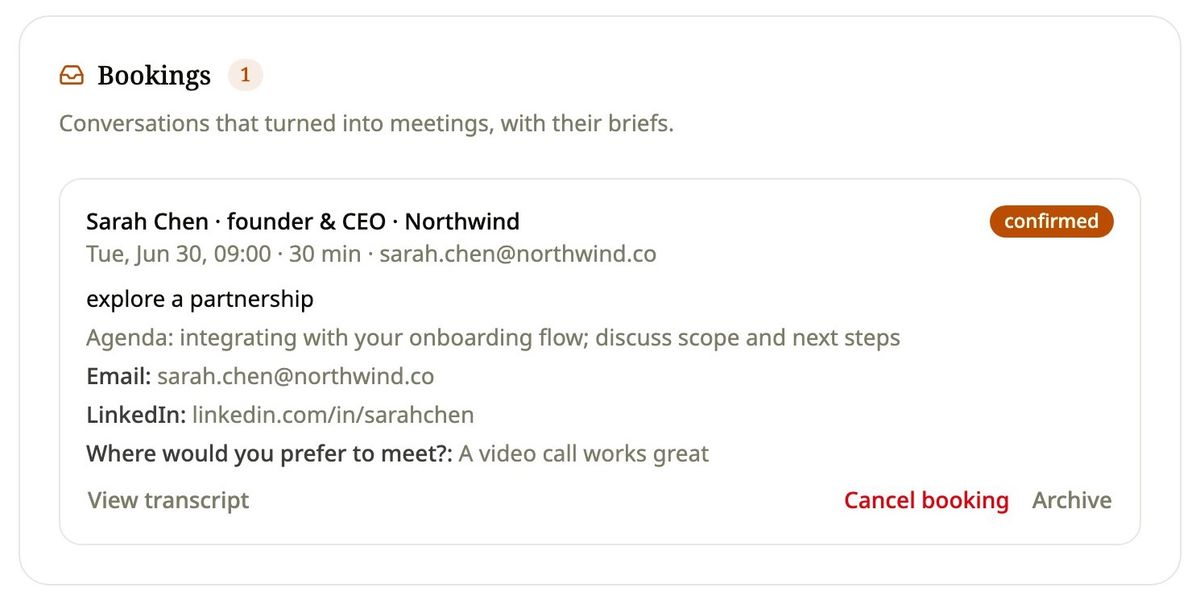
Forms and conversations don't just differ at the guest's end — they hand you very different things. With a form, you get a row in a spreadsheet: timestamp, name, email, and a "notes" cell that's blank more often than not. With conversational intake, you get a meeting brief — who the guest is, why they're booking, what they want to discuss, plus every required field, captured cleanly and waiting in your inbox before the call.
Here's the contrast, side by side.
| What you're comparing | Intake form (Typeform / Google Form / "notes" box) | Conversational intake (Yoya) |
|---|---|---|
| Completion | Often skipped or half-filled; every extra field drops completion | Higher — it's the booking flow, not an add-on |
| Quality of answers | One-shot, often one word; no way to probe | Adapts with follow-ups; thin answers get clarified |
| Friction | Feels like paperwork after finding a time | Feels like a welcome; one question at a time |
| Required fields | An asterisk and a wall; invites fake input | Asked conversationally; can't be skipped, no gate |
| What the host receives | A spreadsheet row, often empty notes | A meeting brief, ready before the call |
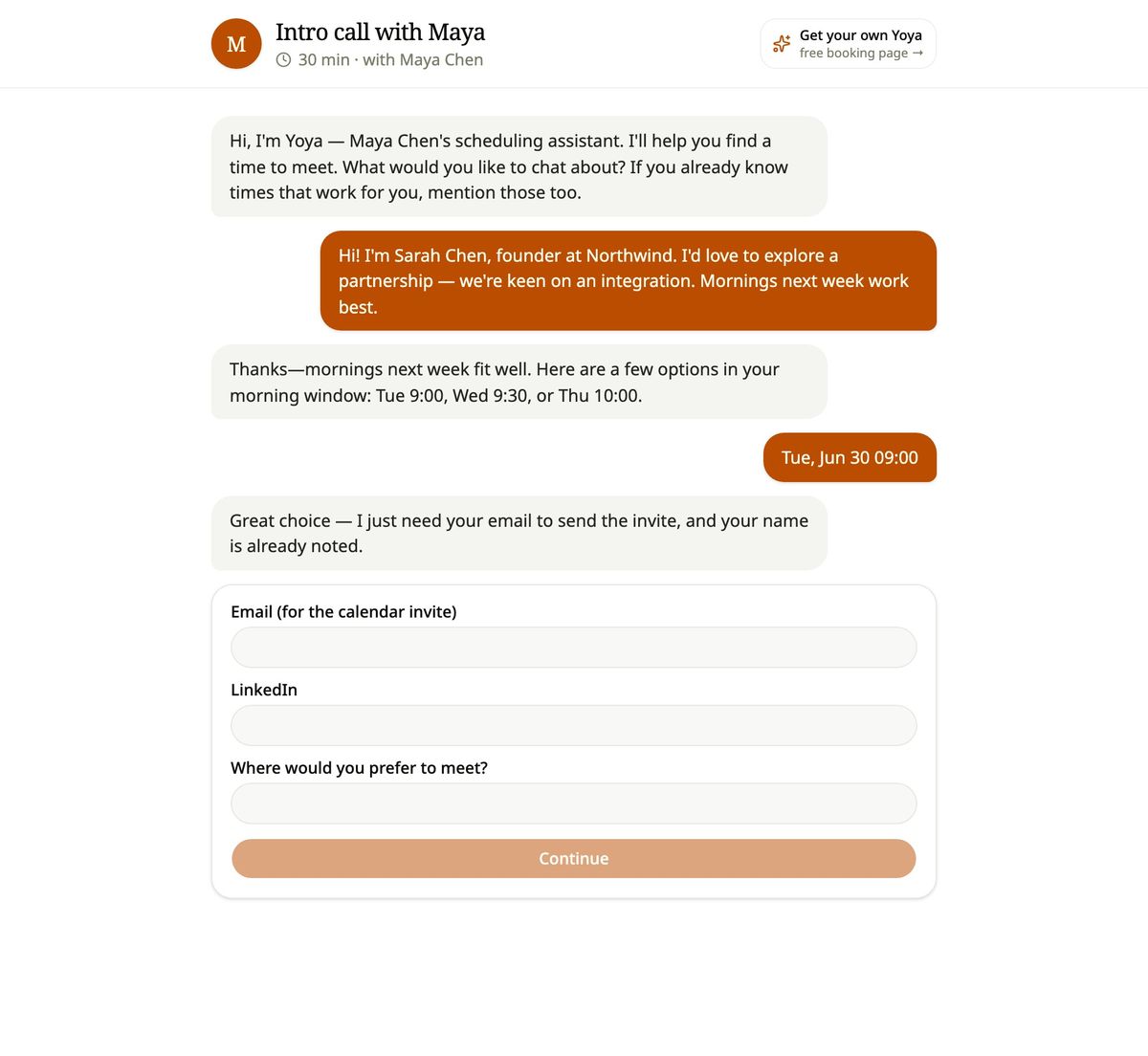
The difference compounds. A briefed guest means you open the call already knowing the context, which means a better meeting, which is the entire point of letting someone book your time. That's the thesis behind never walking into a meeting unprepared: the prep should happen automatically, at booking time, without you chasing anyone for it.
To be fair: forms still have their place
A confident argument shouldn't pretend the other side is worthless. Forms are genuinely good at some things, and it's worth being honest about where.
When you need structured, identical data from a large group — a registration list, a survey, an application you'll sort and filter in a spreadsheet — a form is the right tool. Uniformity is a feature there. You want every response in the same shape so you can analyze the set, and a conversation that wanders would just make the data messier. Forms also win when there's no relationship to build: a one-way submission to a queue, where nobody's prepping for a face-to-face.
The case here is narrower and sharper. For the specific job of collecting context before a 1:1 meeting — where the goal isn't clean rows but a prepared host and a guest who feels heard — the conversation wins. That's also why founders and busy operators are increasingly reaching for a Calendly alternative built for founders: the booking link shouldn't just reserve time, it should do the intake for you. Use a form to collect data. Use a conversation to prepare for a person.
Frequently asked questions
Isn't an intake form faster for the guest?
It feels faster because it's all on one screen, but "fast to skip" isn't the same as fast to complete well. A short chat asks one thing at a time and only goes as deep as it needs to, so a guest with little to say is done quickly — and a guest with a lot to say actually gets to say it.
Won't people find a chat annoying or slow?
Not when it's tight. Yoya keeps it to a handful of relevant questions, skips what doesn't apply, and adapts to short answers. The goal is a brief welcome, not an interview. Most guests find being asked good questions more pleasant than facing a blank box.
How do required fields work in a conversation?
You define what's non-negotiable — LinkedIn, phone, company, whatever your call needs. Yoya asks for each one conversationally and won't finish the booking until she has it. Required by design, but without the asterisk-and-error-message wall that makes people enter junk.
Can I still get clean, structured data out of it?
Yes. The conversation is the friendly front end; what lands in your inbox is a structured meeting brief with the same fields every time. You get the warmth of a chat and the tidiness of a form, instead of choosing between them.
Does this replace my calendar and booking logic?
No — it sits right on top of it. Yoya offers only real open times from your live availability, respects your weekly hours, blocked dates, and time zones, and never double-books. The conversation handles intake; your calendar still runs the schedule.
Are forms ever the better choice for booking?
For collecting context before a meeting, rarely. If you're gathering identical structured data from a crowd with no call attached — registrations, surveys — a form is fine. For prepping a 1:1, a conversation gets more, more reliably.
The welcome, not the paperwork
The intake form had one job — make sure you walk into a meeting prepared — and it quietly fails at it, because asking feels like a chore and a chore gets skipped. The fix was never a tidier form. It's recognizing that the moment someone books your time is a moment to start a conversation, not hand them a clipboard.
Yoya turns that booking into a short, warm chat that collects what you actually need, adapts when an answer is thin, and quietly insists on the essentials — then hands you a brief before the call. No asterisks, no empty "notes" box, no walking in blind. Meet Yoya and let your booking link do the intake for you.