What an AI scheduling assistant should cost in 2026
The Yoya TeamAug 12, 2026Updated Aug 13, 20267 min read

Booking links were cheap for a good reason: they barely did anything. A link, a grid of times, a calendar write. The marginal cost of one more booking was rounding-error hosting, which is why the whole category settled on a flat per-seat fee and stopped thinking about it.
An assistant that holds a conversation with your guest is a different kind of software. Every booking now involves a language model reading and writing, sometimes speech synthesis and recognition, sometimes a research call to work out who is coming. Those have a cost per booking that does not round to zero — and pricing that pretends otherwise is either subsidising heavy users or quietly capping them.
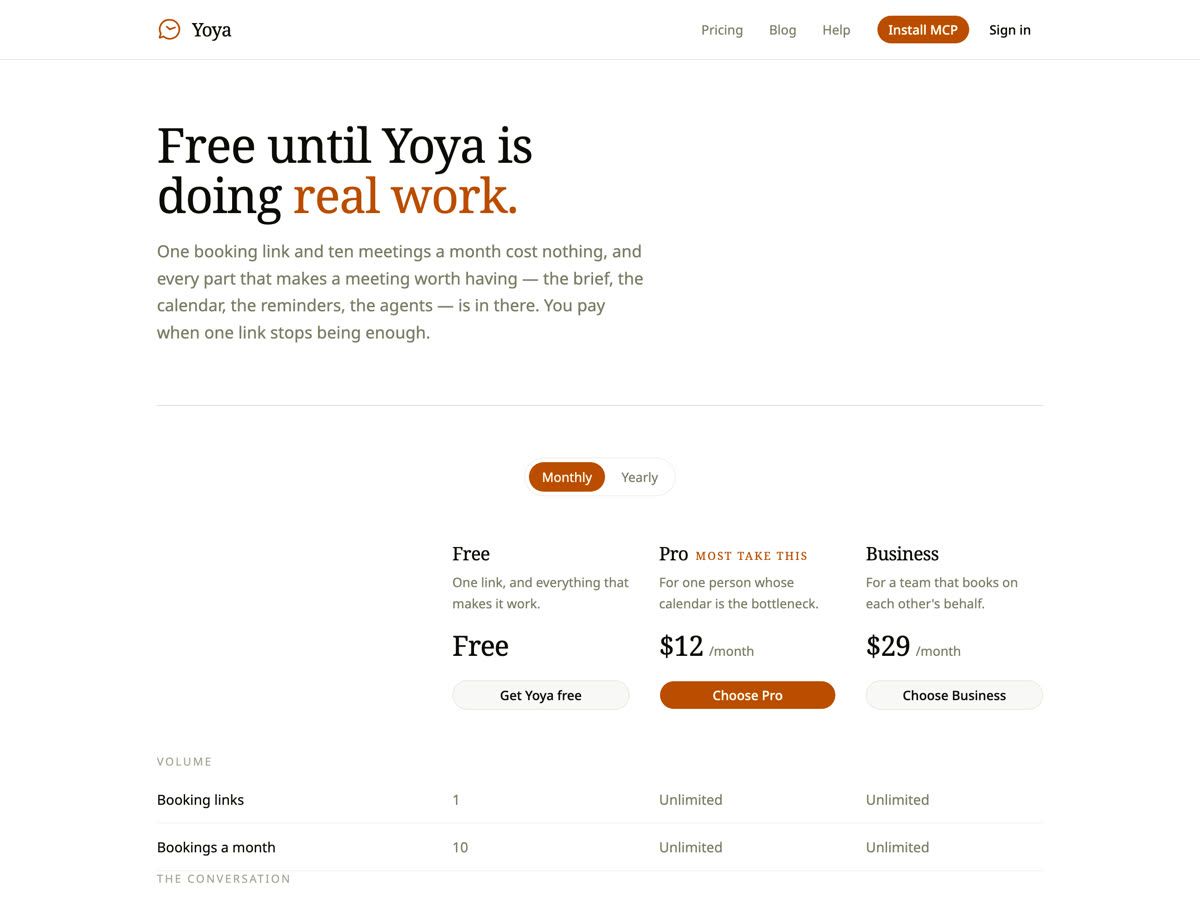
The short answer: expect a free tier that covers a personal booking link, a paid tier around $10–15 a month for unlimited links and bookings, and separate metering for anything with a real unit cost — voice minutes above all. Yoya is free for one link and ten bookings a month, $12 for Pro, $29 for Business, with voice metered in minutes and topped up in $3 packs.
Here is what actually drives the cost, and what to look for when you compare.
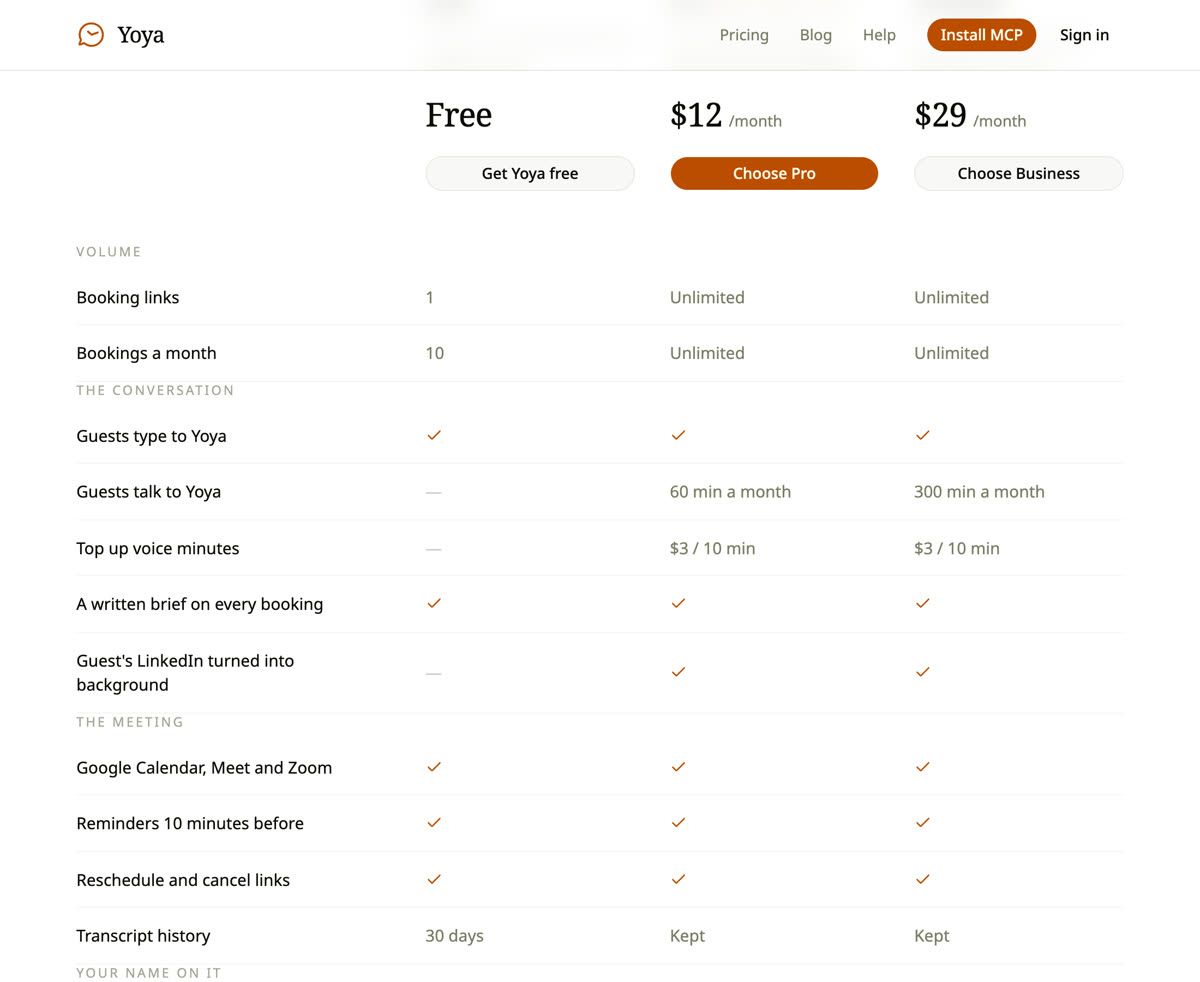
| Free | Pro — $12/mo | Business — $29/mo | |
|---|---|---|---|
| Booking links | 1 | Unlimited | Unlimited |
| Bookings a month | 10 | Unlimited | Unlimited |
| Guests type to the assistant | Yes | Yes | Yes |
| Guests talk to it | — | 60 min a month | 300 min a month |
| Top up voice | — | $3 / 10 min | $3 / 10 min |
| Written brief per booking | Yes | Yes | Yes |
| Guest's LinkedIn as background | — | Yes | Yes |
| Bookable by AI agents over MCP | Yes | Yes | Yes |
| Transcript history | 30 days | Kept | Kept |
What actually costs money
Three things, in rough order of how much they matter.
Voice is the expensive one. Speech recognition and synthesis are billed per minute by the providers underneath, and a booking conversation runs three to five minutes. This is the one component where a heavy user genuinely costs meaningfully more than a light one, which is why almost every honest product in this category meters it rather than folding it into a flat fee.
Language model calls are cheap but not free. A typed booking conversation is a handful of turns, plus writing the brief. At current model prices this is fractions of a cent — small enough to include in a free tier, large enough that "unlimited AI conversations on the free plan, forever, for everyone" is a promise someone eventually has to break.
Everything else is the old cost structure. Calendar reads and writes, sending email, storing a booking. These are the costs booking links have always had, and they are why the free tier can be genuinely useful rather than a three-day trial.
The practical consequence: be suspicious of any plan that offers unlimited voice. Either it is priced for the heaviest user — which means you are paying for someone else — or there is a cap that has not been written down and you will discover it in the middle of a month.
Per seat, per booking, or per conversation?
Three pricing models are in circulation, and they suit different buyers.
Per seat is the incumbent model. Simple to forecast, and fine when the product is storage plus a calendar view. It ages badly for an assistant, because one person taking forty conversational bookings a month costs the vendor far more than one taking three, and the price cannot tell them apart.
Per booking sounds fair and behaves badly. It puts a meter on the exact thing you want to encourage, and it makes the tool feel expensive on the month you finally get traction. Nobody wants to think about unit cost while deciding whether to take a call.
Flat with metered extras is where the category is landing, and it is the model Yoya uses: unlimited bookings and links on a paid plan, with only the genuinely per-unit thing — voice — metered. You get a forecastable bill, and the one component with a real marginal cost is the one you can see and control.
The test for whether a metered component is honest is what happens when you hit the limit. If the whole product stops, the limit was a lever. If only the metered feature stops and everything else carries on, the limit was a cost.
What a free tier should actually include
A free tier in this category is doing one of two jobs: it is either a trial with a countdown, or a genuinely usable product for the person whose needs are small.
The second is more useful to both sides, and the way to spot it is whether the free plan includes the thing that makes the product different. A free plan that gives you a booking link but not the conversation is a worse version of tools that are already free. A free plan that gives you the conversation, the brief, and the calendar integration — but caps how many bookings a month — lets a light user stay free forever and someone with higher booking volume see when they need to upgrade.
Yoya's free plan takes the second shape: one booking link, ten bookings a month, the full conversation, a written brief on every booking, Google Calendar with a choice of Google Meet or Zoom, reminders, reschedule and cancel. Notably it is also bookable by AI agents over MCP, which is the newest capability and the least obvious thing to include for free. The reasoning is that agent booking only becomes useful when enough links support it, and putting it behind a paywall on day one would guarantee it never got there.
What free does not include is anything with per-minute cost (voice), anything that calls a third-party research API (turning a guest's LinkedIn into background), and indefinite transcript storage.
The questions to ask before you pay
- What happens at the limit? Does the product stop, or does the metered feature stop? Ask specifically what your guests see. A cap that shows a stranger an error costs you the meeting.
- Do purchased add-ons expire? If you buy extra minutes and they vanish at month end, you did not buy minutes, you rented them.
- Is the AI capability on the free plan, or is "free" just a link? This tells you whether the free tier is a product or a demo.
- What happens to your data when you downgrade? Retention differences between plans are normal; silent deletion is not.
- Is annual billing a real discount or a lock-in? Two months free is the usual shape.
- Can you export? Bookings and transcripts should be yours.
Where the money goes for a solo user versus a team
For one person, the calculation is simple. If you take a handful of intro calls a month, free is genuinely enough and you should stay there. The moment you want more than one booking link — separate hours for a coffee chat and a client call, say — you are on Pro, and $12 buys unlimited links and bookings plus 60 minutes of voice.
Business includes 300 voice minutes per month and lets you customize the host name on each booking page. Calendar connections still belong to the account holder. Choose it when you need more voice capacity or different host names across your pages.
The honest advice is that most people reading this should start free and let the product tell them when they have outgrown it. A scheduling tool that costs less than a single missed meeting is not where you should spend your evaluation energy; whether the assistant actually captures useful context is.
Frequently Asked Questions
How much does an AI scheduling assistant cost?
Expect a usable free tier, a personal paid plan around $10–15 a month, and a team plan around $25–35. Yoya is free for one link and ten bookings a month, $12 for Pro with unlimited links and bookings, and $29 for Business.
Why is voice priced separately from everything else?
Because it is the only part with a real per-minute cost. Speech recognition and synthesis are billed by the minute by the providers underneath, so including it in a flat fee would mean light users subsidising heavy ones.
What happens when I run out of voice minutes?
On Yoya the microphone stops being offered on your booking page. Guests can still book by typing and are never told anything ran out. You can add 10 minutes for $3, and bought minutes do not expire.
Is the free plan a trial?
No. It is a plan. One booking link, ten bookings a month, the full conversation, the brief, calendar and video integrations, and MCP booking. There is no countdown and no card.
Do I need a credit card to start?
No. The free plan needs an account and nothing else.
Is annual billing cheaper?
Yes — Pro is $10 a month billed yearly and Business is $24, which works out to at least two months free compared with monthly billing.
What if I downgrade?
You keep your bookings and your pages. What changes is what is enforced going forward: paid-only features stop, and transcript retention returns to the free window of 30 days.
Start free
The useful thing about a real free tier is that you do not have to make this decision now. Create a booking link, take a few real meetings on it, and see whether the briefs change how prepared you are. If they do, the upgrade decision makes itself; if they do not, you have lost nothing.
Yoya is free to start — one link, ten bookings a month, no card — and the full breakdown of what each plan includes is on pricing.
If you are weighing it against what you use today, The best Calendly alternative for founders covers the comparison in more depth.