An Acuity Scheduling alternative built around conversation
The Yoya TeamSep 4, 20264 min read

Acuity Scheduling has a reputation it earned: its intake forms are widely considered among the best in the scheduling space, with conditional logic that shows different questions depending on earlier answers. If your business runs on collecting structured information before an appointment, Acuity does that properly.
So this isn't a post about Acuity being bad at forms. It's a post about forms.
Where Acuity is genuinely strong
Acuity is built for appointment-focused service businesses — clinics, salons, studios, tutors, therapists — and it shows in the feature list:
- Service menus. Different appointment types, durations, and prices in one place.
- Payments and packages. Deposits, prepayment, class packs, memberships.
- Client records. History, notes, repeat bookings.
- Recurring appointments and class scheduling.
- Intake forms with conditional logic, which for a clinic is not a nice-to-have — it's the medical history.
Pricing runs $16 to $49 a month on annual billing, $20 to $61 monthly, with a 7-day trial and no permanent free plan.
If you run a salon, a clinic, or a studio, stop here and keep Acuity. Taking a deposit, managing a service menu, and storing a client's history are the whole job, and nothing in this post replaces any of it.
The part that doesn't work as well as it looks
There's a different customer using Acuity: the consultant, coach, fractional exec, or agency owner who books discovery calls. Same tool, very different job. And for that job the intake form is where things quietly leak.
Three things go wrong, and none of them are Acuity's fault — they're what forms are:
People skip them. Every field you add is a reason to close the tab. Nobody who has run a booking page has failed to notice that the form with eight questions converts worse than the form with two.
People half-fill them. "What would you like to discuss?" gets "chat", "general enquiry", or "see above." Technically answered. Tells you nothing.
You have to guess the questions in advance. A form asks the same things of a solo founder and a 200-person company. The follow-up question that would have made the call useful — the one that depends on the previous answer — is the one you can't write down ahead of time. Conditional logic helps here and is genuinely Acuity's strength, but it still only branches between questions you already thought of.
The result is a discovery call that starts with discovery, using the time you booked for the actual conversation.
What a conversation does instead
Yoya replaces the form with a chat. A client opens your link and says what they want in their own words. Yoya asks the follow-up — the real one, based on what they just said — offers times from your calendar, books one, and writes you a brief.
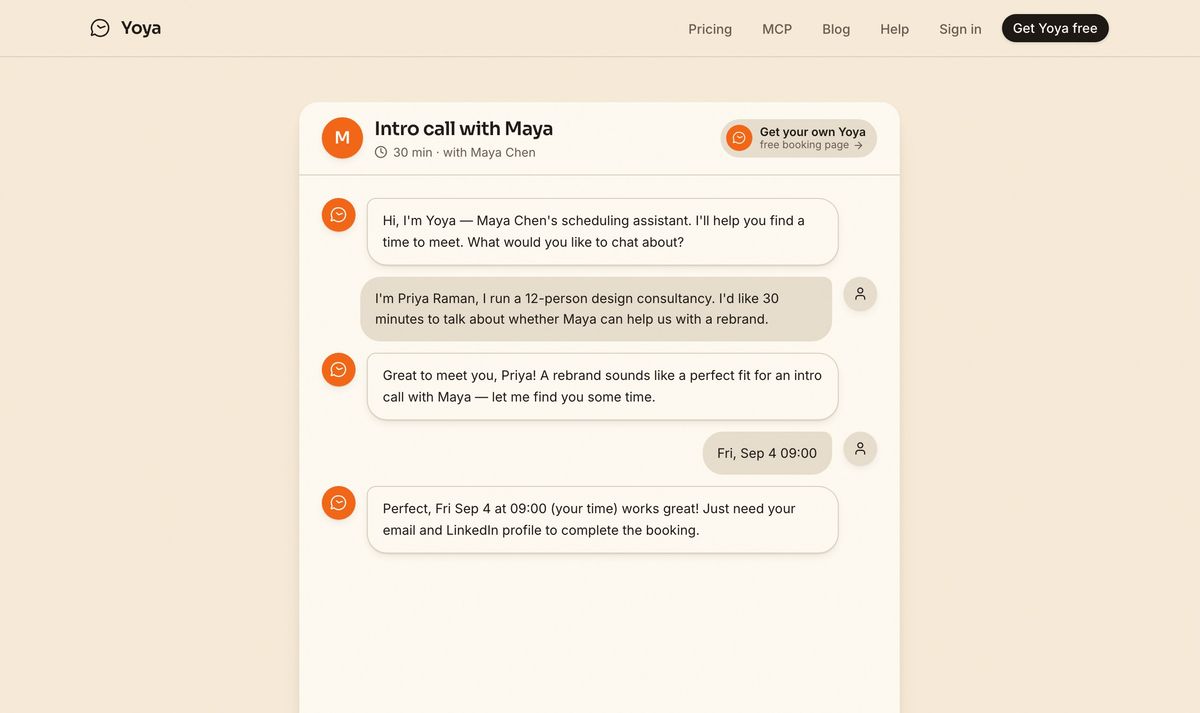
The required details are asked for once there's a reason to give them.
The difference in what you get: instead of "Priya Raman — general enquiry — Friday 9am", you get that she runs a twelve-person design consultancy, she's asking about a rebrand, and she's evaluating whether you're the right fit. Same booking. A different call.
You can still require fields. Tell Yoya that email and LinkedIn are required and it will ask for them and not book without them — the difference is that they're asked for in a conversation someone is already having, rather than fronted as a gate before they've decided.
The comparison
| Acuity Scheduling | Yoya | |
|---|---|---|
| Price | $16–49/month, no free plan | Free, then $12/month |
| Collecting client info | Forms with conditional logic | A conversation |
| Follow-up questions | Only ones you scripted | Written in response to the answer |
| Brief before the call | Form answers | A written brief |
| Payments and deposits | Yes | No |
| Service menus and packages | Yes | No |
| Recurring appointments | Yes | No |
| Classes and group bookings | Yes | No |
| Client records and history | Yes | Booking history only |
| Bookable by an AI agent | No | Yes, over MCP |
Four rows in the middle are a clear no. If you take payment at booking, sell packages, or run classes, Acuity wins outright — that's most of what it's for.
Who should stay with Acuity
- You take deposits or payment at the time of booking.
- You have a service menu with more than a handful of appointment types.
- Recurring appointments or classes are part of the business.
- You need client records with history — a clinic's notes, a studio's attendance.
- Your intake genuinely is a fixed set of questions everyone must answer. A medical history is not a conversation.
Who should try a conversation
- Consultants and coaches whose discovery calls are all different.
- Fractional execs and freelancers taking intro calls from strangers.
- Agencies where "what do you need?" has no useful multiple-choice version.
- Anyone whose intake form is three questions long because they gave up adding a fourth.
Trying it without switching
You don't have to move anything. Make a Yoya link, put it where your discovery-call link currently goes, and leave Acuity running everything that takes payment. Two links, two jobs — the paid appointments stay where the payments are, and the calls where you're still working out whether there's a fit go somewhere that finds out for you.
After a week you'll have briefs for the calls that went through Yoya and form answers for the ones that didn't, which is a more honest test than anything in this post.
Set up a free booking link, or read the longer argument in the intake form is dead.
Sources: Acuity pricing, Koalendar · Acuity profile, Capterra · Acuity tested, PuzzleInbox