A Cal.com alternative for conversational booking
The Yoya TeamSep 4, 20264 min read

Cal.com is the tool I'd recommend to a specific person: someone who wants Calendly, wants the source, and is comfortable running it. It's AGPL-licensed, genuinely good, and you can put it on a €4.50 Hetzner box and have unlimited users for about $54 a year. For a technical team with an ops habit, that's a real offer and nothing here beats it on price.
But two different people search for "Cal.com alternative", and they want opposite things:
- "I like the idea but I don't want to run it." You tried self-hosting, hit Postgres migrations and OAuth app registration on a Tuesday night, and decided your time is worth more than $12 a month.
- "I've got it running and it still doesn't do the thing I wanted." You have a booking link. It finds times. You still walk into calls knowing nothing about who's on them.
They need different answers, so this covers both.
Where Cal.com is genuinely strong
It's actually open source. AGPLv3, real repository, real contributors. If you need to read the code that handles your calendar, or your compliance team does, that ends the discussion in Cal.com's favour.
Self-hosting is real, not theatre. Plenty of "open source" products keep the useful half behind a cloud plan. Cal.com's self-hosted build is the product.
The free tier is generous. One user, unlimited event types, unlimited bookings, no card. Their paid Teams plan is $12 per user per month billed yearly; Organizations is around $37.
Extensibility. Apps, webhooks, an API that assumes you'll build on it.
If data ownership is the requirement, stop reading — self-host Cal.com. That's the right call and no hosted product should talk you out of it.
What self-hosting actually costs
The €4.50 server is the honest part of the price. The rest:
- Postgres you back up, and restore when you need to.
- Upgrades, on a project that moves fast — including the migrations.
- Google and Microsoft OAuth apps registered under your own credentials, with the verification that implies.
- Email delivery, which is its own afternoon.
- Being the on-call engineer for your own booking page. When it's down, nobody can book you and nobody else is looking.
None of that is hard. It's just never finished, and the person who ends up doing it is usually the same person whose calendar the tool exists to protect.
The other reason people leave
This one has nothing to do with hosting.
Cal.com, Calendly, and everything in that category solve finding a time. That problem is solved — genuinely, completely, a decade ago. What none of them do is tell you anything about the meeting before you're in it.
You get a name, an email, a slot, and whatever fields you had the nerve to bolt onto the form. Then you spend the first eight minutes of a thirty-minute call working out who this person is and what they want. On a good day. On a bad day you never find out and the call was for nothing.
That gap is the reason to look at a different kind of tool, not a cheaper one.
What Yoya does differently
Yoya is a booking link that holds a conversation. Your guest opens it and talks instead of filling in a form: what they want, who they are, what they're hoping for. Yoya offers real times from your calendar, books one, and writes you a brief before the call.
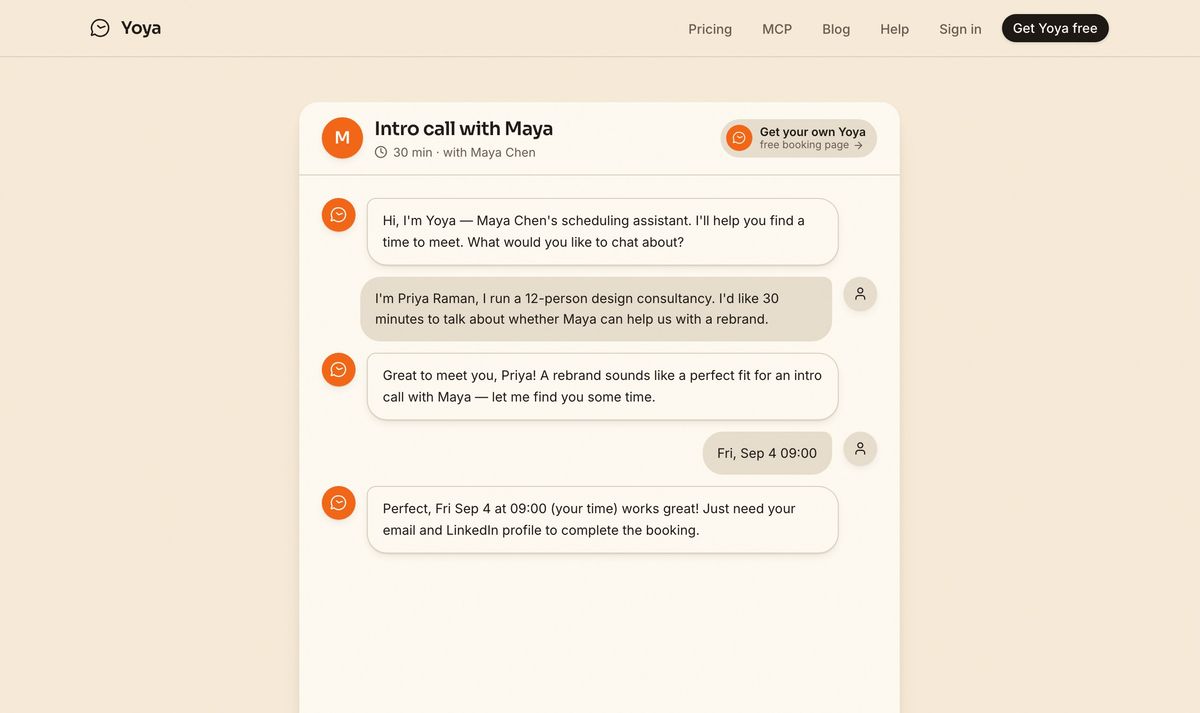
Required fields get asked for in the conversation, so they actually get answered.
There's a second thing that matters if you're the kind of person who self-hosts: Yoya is bookable by AI agents. It exposes an MCP endpoint, so someone's assistant can find a time and book it on your calendar without a human ever opening the page. That's a category the form-and-grid tools structurally can't enter — there's no grid for an agent to click.
The comparison
| Cal.com (self-hosted) | Cal.com (cloud) | Yoya | |
|---|---|---|---|
| Price | ~$54/year server | Free, then $12/user/mo | Free, then $12/month |
| You run the server | Yes | No | No |
| Source available | Yes, AGPLv3 | Yes | No |
| Data on your infrastructure | Yes | No | No |
| Finds a time | Yes | Yes | Yes |
| Guest fills a form | Yes | Yes | No, they talk |
| Brief before the call | No | No | Yes |
| Bookable by an AI agent | No | No | Yes, over MCP |
| Voice booking | No | No | Yes |
| Upgrades and backups | Yours | Theirs | Theirs |
The row that should decide it is "data on your infrastructure." If that's a yes for you, Cal.com self-hosted wins and nothing below it matters. If it's a no — if you assumed self-hosting because it seemed like the serious choice rather than because you need it — then the rest of the table is the real comparison.
Who should stay on Cal.com
- Your compliance position requires the data on your own infrastructure.
- You already run it, it works, and upgrades don't bother you.
- You need the source to modify, not just to read.
- You have a team large enough that per-seat pricing genuinely hurts and you have someone who enjoys the ops.
Who should try something hosted
- You self-hosted to save money and it cost you a weekend.
- You're one person and the "unlimited users" advantage is theoretical.
- What you actually wanted was a better meeting, not a cheaper booking page.
- You'd like your booking link to work for AI agents as well as people.
Moving over
There's nothing to migrate, which is the odd mercy of booking links. Set your hours, get a link, replace the old one in your signature. Past bookings stay where they are; Cal.com keeps running until you turn it off, so there's no cutover to get wrong.
Set up a free booking link and take one real meeting through it. If you miss owning the database, you'll know within a week — and Cal.com will still be there.
Sources: Cal.com pricing guide, SchedulingKit · Self-hosting Cal.com, OSSAlt