9 Calendly alternatives in 2026, sorted by the problem you actually have
The Yoya TeamSep 4, 2026Updated Sep 4, 20266 min read

Every list of Calendly alternatives has the same problem: it ranks nine tools from best to worst as though they all do the same thing. They don't. Doodle finds a time across twelve people. Acuity takes a deposit. Chili Piper routes a lead to the right rep. Calling those "alternatives" to each other is like ranking a van against a bicycle.
So this list is sorted by the problem instead. Find your sentence, get the tool.
A disclosure before we start: this is the Yoya blog and Yoya is one of the nine. It's in the section where it genuinely fits and not at the top, and every other entry has a real reason to pick it over ours. Judge the list on whether the other eight are described fairly.
First: are you sure you need one?
Calendly's free plan is genuinely free, permanently: one event type, one calendar, video links, a booking page. Paid starts at $10 per seat per month billed annually ($12 monthly) for Standard, and $16 ($20 monthly) for Teams.
If the free plan works and you only left because you assumed you'd outgrown it, the cheapest alternative is the one you already have.
People genuinely leave for five reasons: cost at scale, data ownership, payments, group scheduling, and — the one nobody puts on a comparison chart — the booking tells them nothing about the meeting.
---
"I want free, or close to it"
Koalendar
Koalendar offers a free plan and paid options. It is worth evaluating when you want straightforward booking links. Check its current pricing page for calendar limits, features, and the applicable billing period.
Pick it if: you need more than one event type and don't want to pay for the privilege.
TidyCal
TidyCal offers free and paid plans, including one-time purchase options. Check its pricing page for the current tiers, team features, and any conditions attached to lifetime access.
Pick it if: you resent the monthly line item more than you want features. The maths is unbeatable and the ceiling is low; that's the trade.
---
"I want to own the data"
Cal.com
Cal.com offers cloud-hosted scheduling and a self-hosting option. Review the repository license, edition-specific features, and infrastructure requirements before deciding that self-hosting fits your team.
Pick it if: your compliance position requires the data on your infrastructure, or you need to read and modify the code.
Be honest about the cost: the server is the cheap part. Postgres backups, migrations on a fast-moving project, your own Google and Microsoft OAuth apps, email delivery, and being on call for your own booking page. None of it is hard and none of it ends. The longer version is here.
---
"I take payment when people book"
Acuity Scheduling
Acuity focuses on appointment businesses such as salons, studios, and consultants. Compare its payments, packages, classes, and intake options against your workflow, and confirm current plan prices on its official site.
Pick it if: money changes hands at booking time, or you run classes.
Skip it if: you're a consultant using it only for discovery calls. You're paying for a payments-and-packages engine to hold a form. More on that here.
---
"The guest experience should be nicer"
SavvyCal
SavvyCal emphasizes the guest’s scheduling experience, including calendar overlays. Check its current plans and meeting-poll options if coordinating availability is the main problem you need to solve.
Pick it if: you send a lot of links to busy people and the friction of the time grid is the thing you want gone.
---
"I need to find a time across a group"
Doodle
Not really a Calendly alternative and constantly listed as one. Doodle is a poll: propose times, let a group vote, pick the winner. That's a different job, and for that job it remains the default.
Pick it if: the hard part is twelve calendars you can't see, not one you can.
Don't pick it if: you want a permanent link people book against on their own. That's the other category entirely.
---
"We already pay for the suite"
Microsoft Bookings and HubSpot Meetings
Both are included with a plan you're probably already buying. Neither is the best scheduling tool; both are free-at-the-margin, and that is a very strong argument.
Pick them if: your organisation lives in Microsoft 365 or HubSpot, and "one fewer vendor" is worth more than a better booking page. HubSpot Meetings in particular writes to the CRM you already have, which is most of what a sales team wants.
---
"We have a sales team and inbound to route"
Chili Piper
When a lead fills in a form, Chili Piper decides who should meet them — territory, owner, round-robin, company size — and books it immediately, writing everything back to Salesforce or HubSpot. It's the real thing for enterprise inbound.
Chili Piper’s pricing depends on the product, seats, and routing setup. Request or review a current quote for the exact workflow you need; a single headline price is not a reliable comparison.
Pick it if: who takes the meeting is a decision with rules behind it, and you have the volume to justify it.
Skip it if: the router has one destination, which for founder-led sales it does. More here.
---
"The booking tells me nothing about the meeting"
This is the reason nobody puts on comparison charts, and it's the one I hear most from people who are otherwise happy with Calendly.
You get a name, an email, a time slot, and whatever fields you had the nerve to put on the form. Then you spend the first eight minutes of a thirty-minute call working out who this person is and why they're here. Every tool above solves finding a time. None of them solve knowing what the meeting is.
Yoya
Ours, so weigh it accordingly. Yoya is a booking link that holds a conversation: your guest opens it and says what they want in their own words instead of filling in a form. It offers real times from your calendar, books one, and writes you a brief before the call.
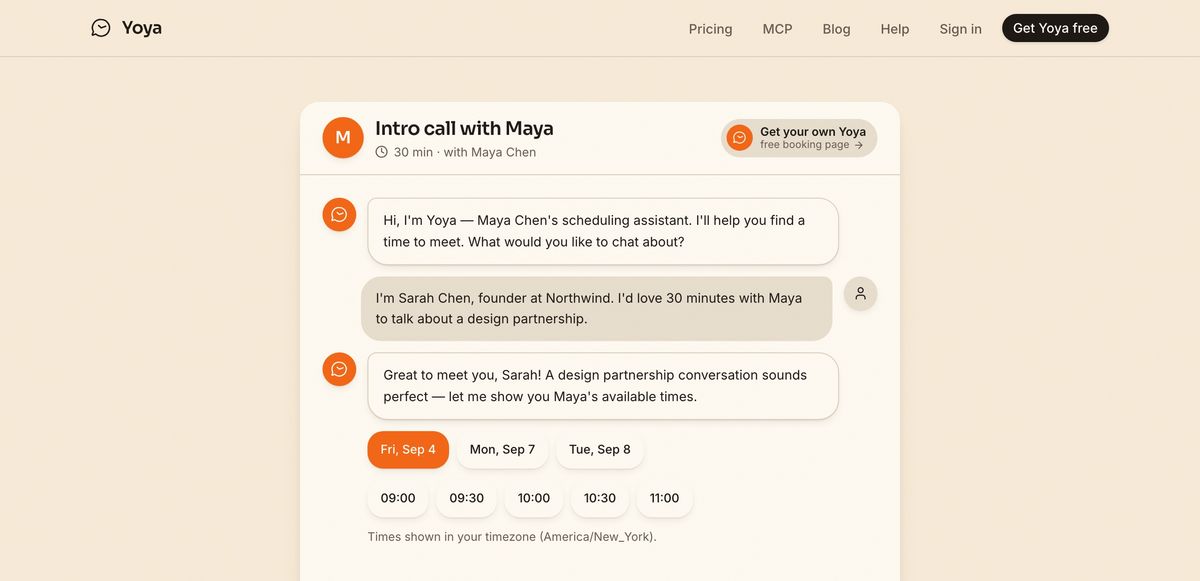
Times are offered inside the conversation, in the guest's timezone.
It also embeds as a widget on your own site, so a Talk to sales button can book a qualified meeting without sending anyone to another domain — and it's bookable by AI agents over MCP, which the form-and-grid tools structurally can't be, because there's no grid for an agent to click.
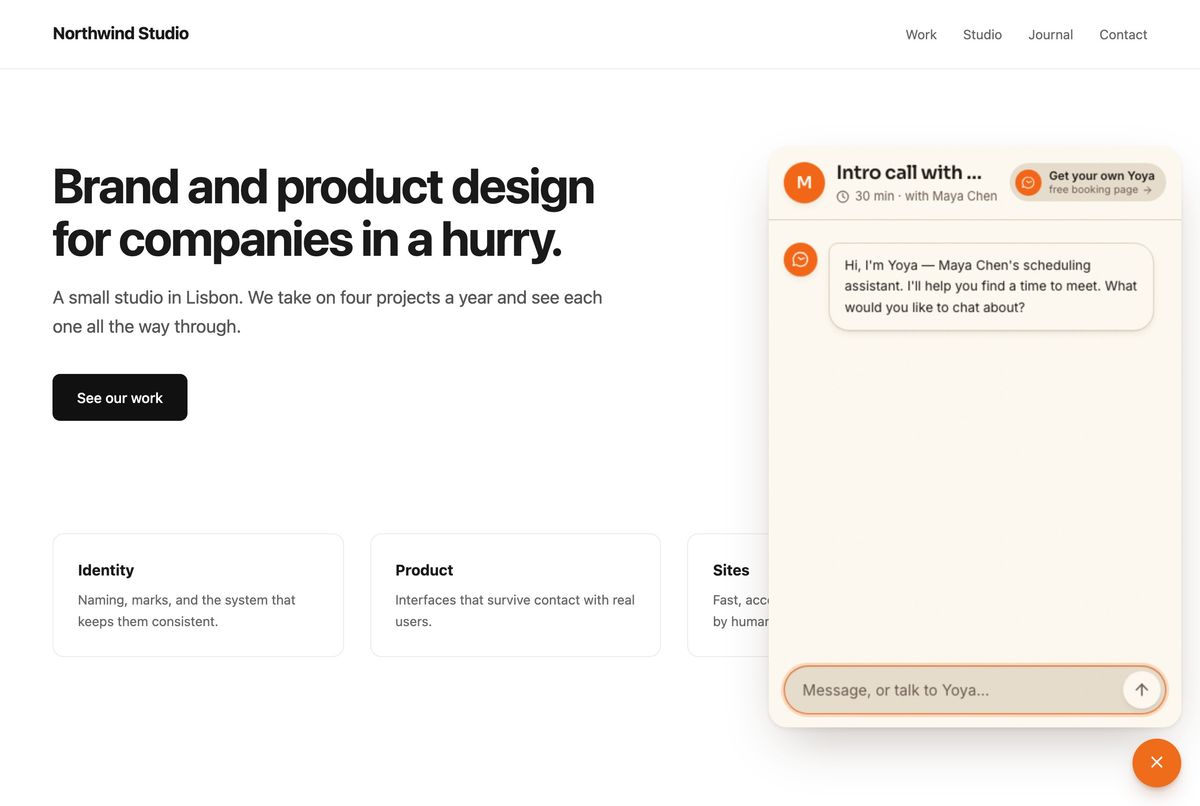
Free, then $12 a month.
Pick it if: your calls are with people you don't know yet and the context matters.
Skip it if: you take payment at booking, run classes, need routing rules and CRM writeback, or need the data on your own servers. Four of the tools above beat us outright on those and I'd rather say so here.
---
The whole list, with 2026 prices
| Tool | Evaluate it for | Where to confirm plans |
|---|---|---|
| Calendly | General scheduling, teams, and connected meeting tools | calendly.com/pricing |
| Koalendar | Straightforward booking links | koalendar.com/pricing |
| TidyCal | Free and one-time purchase options | tidycal.com/pricing |
| Cal.com | Cloud scheduling or self-hosting | cal.com/pricing |
| SavvyCal | Calendar overlays and guest scheduling | savvycal.com/pricing |
| Acuity | Appointments, payments, and packages | acuityscheduling.com/signup.php |
| Doodle | Group availability polls | doodle.com/en/premium |
| Chili Piper | Inbound routing and sales scheduling | chilipiper.com/pricing |
| Yoya | Conversational booking, meeting briefs, and MCP | yoya.ai/pricing |
What isn't a Calendly alternative, whatever the lists say
Two names appear on nearly every list of these and shouldn't:
Reclaim.ai offers calendar planning and scheduling features, including scheduling links. Evaluate whether your main need is organizing your own calendar or collecting context from external guests before they book.
Motion is task management with scheduling attached. Same story: it plans your own week, it isn't a page you send someone.
Both are good products. If you arrived at either expecting a booking link, you'd have been sent by a list that ranked without checking.
---
Pick from your sentence, not from a ranking. And if the sentence is "the tool is fine, the meetings are the problem", set up a free booking link and take one real call through a conversation instead of a form.
Sources: Calendly pricing · Cal.com pricing · Cal.com self-hosting · Acuity pricing · SavvyCal vs Calendly · Chili Piper pricing · Chili Piper cost breakdown