Calendly AI explained: what Callie and Notetaker do, and what they don't
The Yoya TeamOct 21, 20264 min read

The short answer: In August 2026 Calendly added two AI products. Callie is an assistant you copy into an email thread; it reads the conversation, checks your availability and arranges the meeting. Notetaker joins your Zoom, Google Meet or Teams call and turns it into a recording, transcript, recap and follow-up email. Both are aimed at the host. Callie helps when scheduling has already started in email, and Notetaker helps after the meeting. Neither changes what a guest sees when they open your booking link, which is still a time grid and a form.
Here's what each one does, who can use it, and where a different approach fits.
What Callie does
Calendly announced Callie on August 19, 2026, in beta. You bring it into a thread by including callie@calendly.com and saying what you need. Calendly says Callie:
- works inside the email thread and follows its context
- checks your availability
- handles meetings that break your usual rules, such as a different time, place or availability window
- answers in the Calendly app through "Ask Callie," and can recall past meetings or prepare a brief for an upcoming call
That's a real improvement on the classic "here's my link" reply. When a meeting needs negotiating, say a VIP who can only do early mornings or a call that should happen in person, Callie can handle it in the thread instead of you bending your event types.
Calendly also says scheduling links remain the option "for more straightforward needs." Callie sits next to the booking link. It doesn't replace it.
What Calendly Notetaker does
Notetaker is the second half of the launch. It joins Zoom, Google Meet and Microsoft Teams calls, whether they were booked through Calendly or not, and produces a video recording, full transcript and a shareable recap with action items. It drafts follow-up emails, and each recap links to the contact and event type. Recaps are private by default. TechCrunch framed it as Calendly entering a crowded note-taker market.
Who gets Calendly AI
| Callie | Notetaker | |
|---|---|---|
| Status at launch | Beta | Launched the same day, after a beta |
| Where you use it | Email threads, plus "Ask Callie" in the app | Zoom, Google Meet, Microsoft Teams |
| Plans | Aligned to plan level, with new Standard Plus and Teams Plus plans | Aligned to plan level, with new Standard Plus and Teams Plus plans |
| Languages | English-language accounts only, more "coming soon" | English-language accounts only, more "coming soon" |
| Free trial | Beta access during trials "may vary" | Not specified |
Calendly hasn't published per-feature limits in the announcement, so check its pricing page for what each plan includes.
The gap: the booking link itself
Here's the part Calendly AI leaves as it was. Most of your meetings with new people don't start in an email thread you control. They start when someone clicks the link in your LinkedIn profile, your website or your email signature. That person still meets a calendar grid and a set of form fields. You still learn very little about why they booked until you join the call, and the Notetaker only starts working once you're on it.
So there are three moments where AI can help:
- While a time is agreed. Callie covers this when the conversation is in email.
- While the guest books through your link. Calendly's link is still a grid and a form.
- After the meeting. Notetaker covers this.
Yoya is built for moment two.
How Yoya handles the booking moment
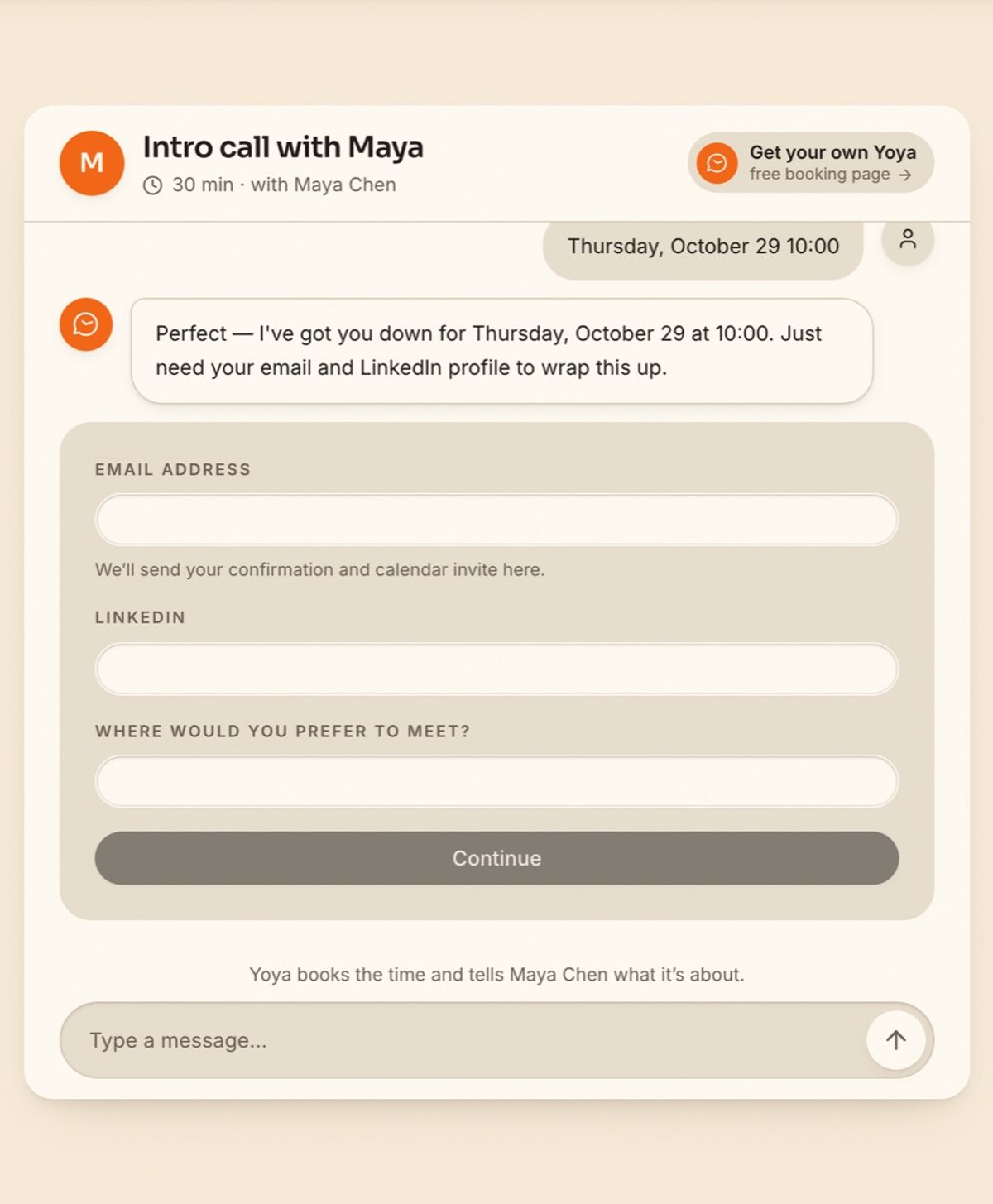
On a Yoya page the guest talks instead of filling in fields. They say who they are and what they want, in their own words and language. Yoya offers real times from your calendar, then asks only for what you've made required, such as email and LinkedIn, in a short card inside the chat.
When the meeting is booked, you get a brief before the call, not a recap after it: who is coming, their role and company, why they booked and what they want to cover.
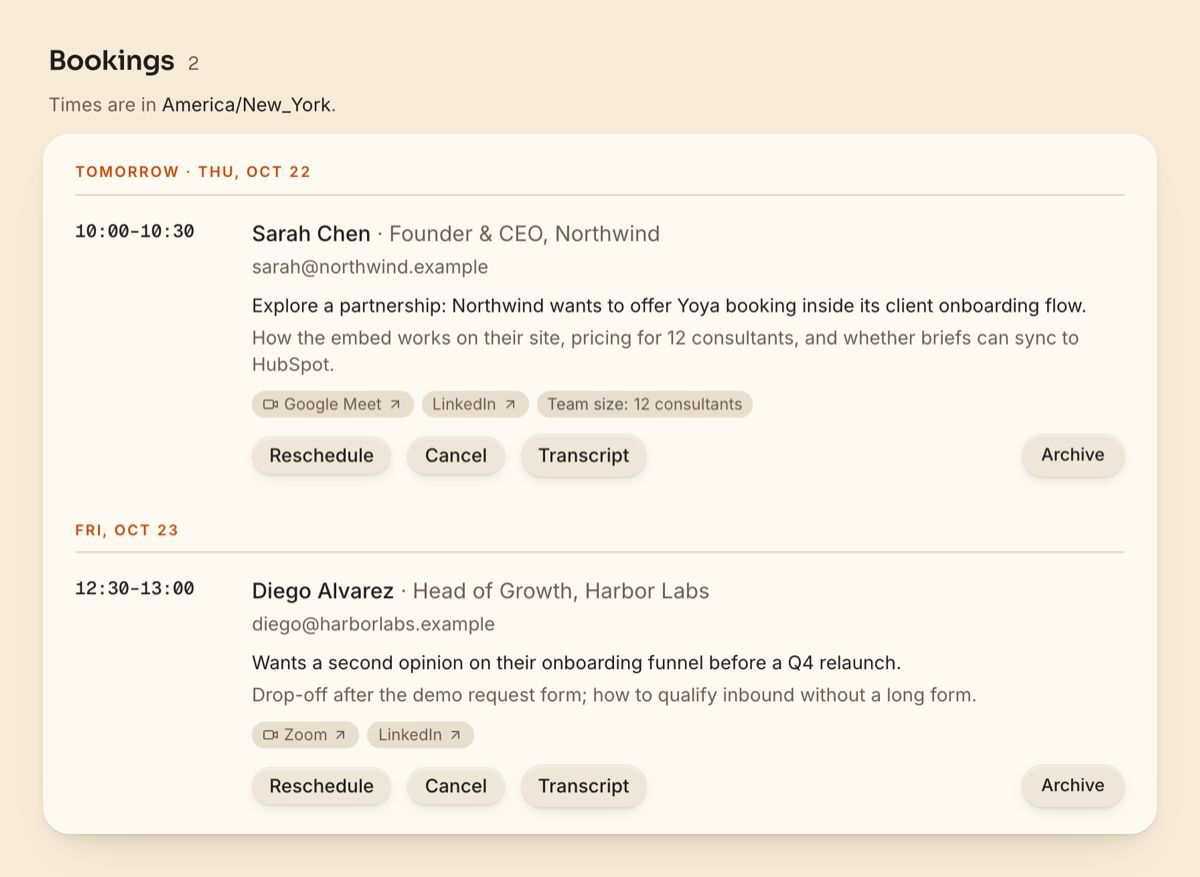
The bookings view above uses demo guests. Every row comes from a booking conversation, and the transcript is one click away if you want the exact words.
The booking page is also open to AI assistants. A guest can hand the booking to Claude or Codex, or any assistant connected to Yoya's public booking server, and still confirm before anything is booked.
Calendly AI vs Yoya, side by side
| Calendly AI | Yoya | |
|---|---|---|
| Main job | Coordinate in email, record and summarize calls | Turn the booking link into a conversation |
| Where the guest books | Calendly's grid and form | A chat (or voice on paid plans) on your link |
| What you know before the call | Calendly says Callie can prepare a brief from past meetings | A brief from this booking's conversation |
| What you get after the call | Recording, transcript, recap, follow-up draft | Not offered. Yoya doesn't record meetings |
| Guest's own AI can book | Not through Calendly's MCP server | Yes, through the public booking server |
| Languages | English accounts at launch | Replies in the guest's language |
| Wider product | Routing, teams, payments, contacts | Teams, payments and group meetings on Business |
These aren't strictly either-or. If you want recordings and recaps, a note-taker of any brand covers the call itself, and Yoya can be the link people book through.
When to choose which
- Your meetings are negotiated in email with a few important people. Callie is designed for that.
- You want recordings and recaps of every call. Notetaker, or another note-taker you already use.
- Strangers book you through a link and you want to know why before you join. Yoya's conversation and brief cover that, starting on the free plan.
- You already pay for Calendly and use routing across a sales team. Stay, and look at Yoya for the links where context matters most. Our Calendly alternatives guide covers the rest of the field.
FAQ
What is Calendly's AI assistant called? Callie. It launched in beta on August 19, 2026, alongside Calendly Notetaker.
How do I use Callie? Add callie@calendly.com to an email thread and tell it what you need, or use "Ask Callie" in the Calendly app.
Is Calendly AI free? Calendly ties Callie and Notetaker to its new Standard Plus and Teams Plus plans. Beta access during free trials may vary.
Does Calendly Notetaker work with Google Meet and Zoom? Yes, plus Microsoft Teams, including meetings that weren't booked through Calendly.
Does Callie work in languages other than English? Not yet. Calendly says expansion to more languages is coming.
Does Yoya record meetings? No. Yoya works before the meeting: the booking conversation and the brief. Pair it with a note-taker if you want recordings.
See what your guests would say before the call. Make a free Yoya page.