5 Reschedule Meeting Email Templates That Stay Polite and Short
The Yoya TeamOct 29, 20264 min read

A good reschedule email does three things in a few lines: it names the meeting you need to move, apologises once, and makes choosing a new time easy. Everything else is optional, including the reason.
Use the templates below as they are or adapt them. Replace the bracketed fields and give every time with a time zone. For a draft built from your own details, use Yoya's free reschedule meeting email generator.
1. A scheduling conflict, with new times
Subject: Rescheduling our [topic] meeting on [day and time]
Hi [Name],
I'm sorry, but I need to move our [topic] meeting on [day and time] because of a scheduling conflict.
Would one of these times work for you instead? [Friday 10:00] or [Monday 15:00] ([time zone]).
Sorry for the change, and thanks for being flexible.
[Your name]
Offer the new times in the same email. "Can we move it?" with no options starts a second thread.
2. Short notice because you're unwell
Subject: Need to move today's [topic] call
Hi [Name],
I'm unwell today and need to move our [topic] call at [time]. I'm sorry for the short notice.
You can pick a new time that suits you here: [booking link], or reply with two or three times next week.
Thanks for understanding,
[Your name]
Keep it brief. Nobody needs symptoms, and a short message sent early is better than a detailed one sent late.
3. A formal request to a client
Subject: Request to reschedule our meeting on [date]
Hello [Name],
I'm writing to ask whether we can reschedule our meeting on [date] at [time] ([time zone]).
Could you let me know which of these times would suit you? [option one], [option two] or [option three].
I apologise for the inconvenience and appreciate your flexibility.
Best regards,
[Your name]
With a client or a senior stakeholder, offering three options in their working hours shows you've thought about their calendar, not just yours.
4. Postponing without a new date yet
Subject: Postponing our [topic] meeting
Hi [Name],
We'll need to postpone our [topic] meeting on [date] while [short reason, for example we wait for the final budget].
I'll come back to you by [date] with new times. If it's easier, you can also book a slot directly once things are clearer: [booking link].
Thanks,
[Your name]
Postponing is different from rescheduling: the meeting moves, but there's no new time yet. Say when you'll follow up so it doesn't drift.
5. Rescheduling because people can't attend
Subject: Moving [meeting name] on [date]
Hi all,
Several people can't make [meeting name] on [date], so we'll move it rather than meet without them.
The new time is [date and time, time zone]. The calendar invite has been updated. Please reply if this doesn't work for you.
Thanks,
[Your name]
For internal meetings, update the calendar event itself and send this as the note, so attendees aren't left with two versions.
How to reply when someone asks to reschedule
Hi [Name],
No problem at all. [Thursday at 11:00 London time] works for me. I'll send an updated invite.
Thanks for letting me know,
[Your name]
If none of their suggested times work, say so in the same reply and offer two of your own.
Subject lines that work
- Rescheduling our project review on Thursday at 3 p.m.
- Can we move tomorrow's call?
- Request to reschedule our meeting on 12 November
- Postponing our planning session
- New time for [meeting name]
Name the meeting and the original time. "Quick question" or "Change of plans" makes people open the email to find out which meeting you mean.
Write it with the free generator
Yoya's generator asks for the meeting, the current time and whether to give a reason. Add new times, a booking link, or neither.
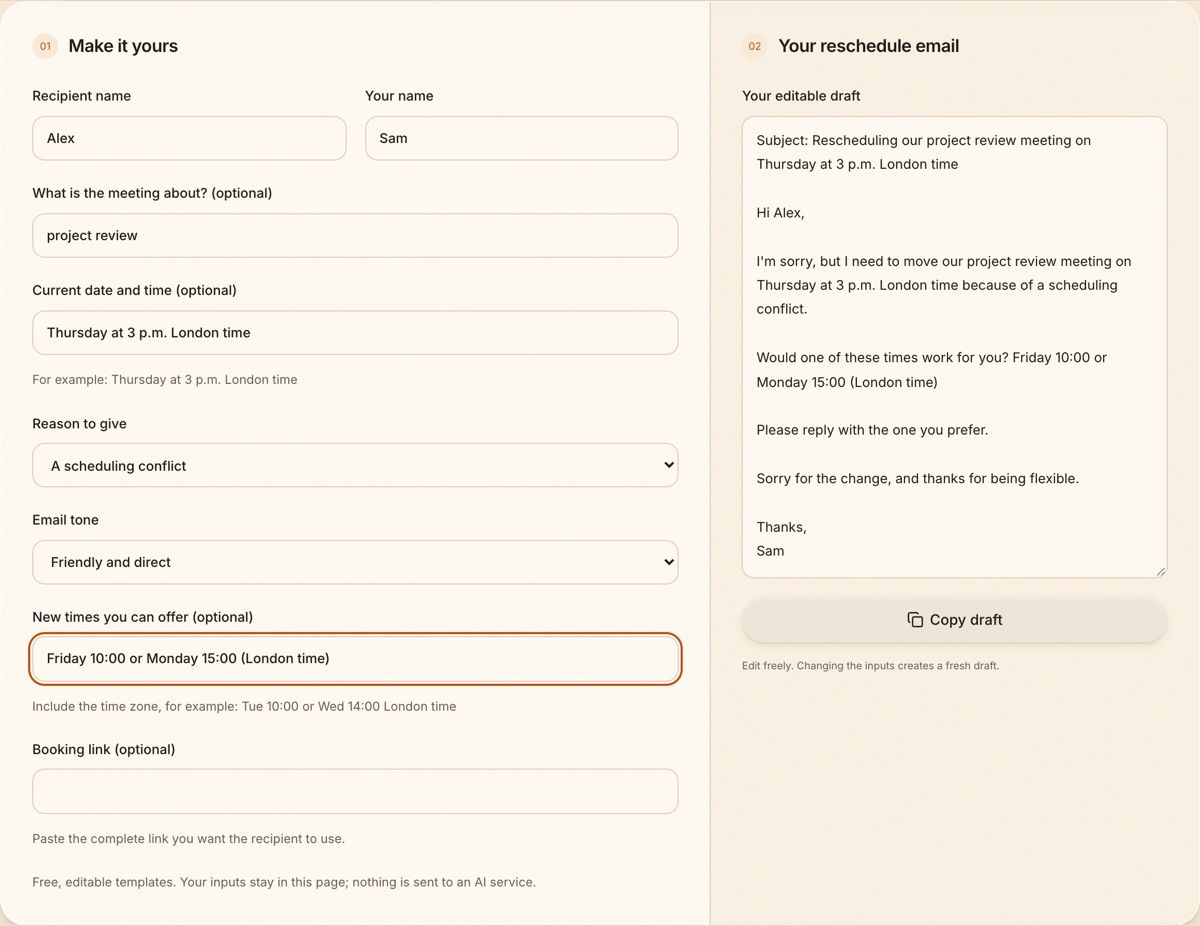
Choose the Formal tone and add a booking link instead of times, and the email changes to match:
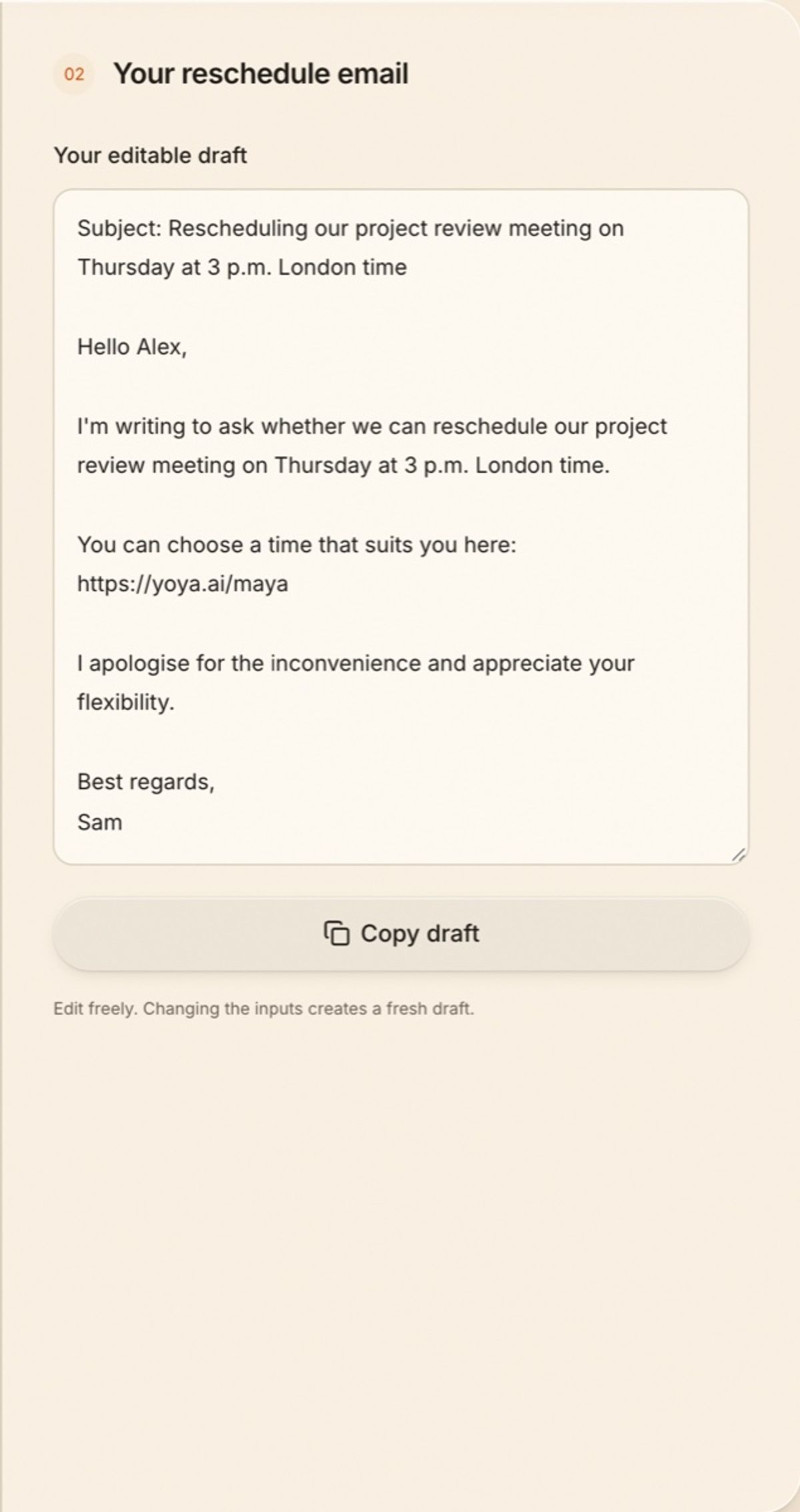
The reason only appears if you pick one, and the email never invents a date. With no times or link, it asks the other person for two or three times in their time zone.
Let people move meetings without an email thread
Most reschedule emails exist because the booking didn't come with an easy way to change it. Every Yoya booking does: the confirmation includes a private link where the guest can pick a new time from your real availability, or cancel. You can also move a booking yourself from the dashboard, and the calendar invite is updated. If you take a lot of meetings with people you haven't met, see how Yoya works for consultants.
FAQ
How do you politely ask to reschedule a meeting?
Name the meeting and its time, apologise once, and offer two or three new times or a booking link. Keep the reason short or leave it out.
Do I have to give a reason for rescheduling?
No. A short reason such as a scheduling conflict can help, but it's not required. Never invent one.
How much notice should I give?
As much as you can. For external meetings, aim for at least a day. If it's the same day, send the email as soon as you know and keep it short.
What is the difference between rescheduling and postponing a meeting?
Rescheduling moves the meeting to a specific new time. Postponing delays it without a new time yet, so say when you'll follow up.