Book a meeting by voice: how it works
The Yoya TeamAug 12, 2026Updated Aug 13, 20268 min read

Watch someone book a meeting on their phone while walking. They tap a date, scroll a column of times, squint, go back because the times were in the wrong timezone, then thumb their name and email into two fields. It takes ninety seconds and their full attention.
Now watch them say: "Any afternoon next week works, I'm Sarah from Northwind, we're hiring a designer." Six seconds, one hand, no keyboard.
The short answer: voice booking lets a guest speak to a scheduling assistant on a booking page instead of typing or picking from a grid. The assistant transcribes, works out what the meeting is about, offers real open times from the host's calendar, and books one — the same flow as the text version, with speech as the input. On Yoya it runs over WebRTC in the browser with no app or plugin, in English, Chinese, Japanese and Spanish.
This is not the same product as an AI phone receptionist, and the difference matters for what it costs and where it fits. Here is how it works and when it earns its place.
| Time-grid form | Typing to an assistant | Talking to an assistant | |
|---|---|---|---|
| Guest input | Taps and typing | Typing | Speech |
| Hands needed | Two | Two | One, or none |
| Works while walking | Poorly | Poorly | Yes |
| Context captured | Only what fields ask | Whatever they explain | Whatever they explain |
| Languages | Whatever you translated | Many | English, Chinese, Japanese, Spanish |
| Cost to the host | Free | Cheap | Metered per minute |
What happens when a guest presses the mic
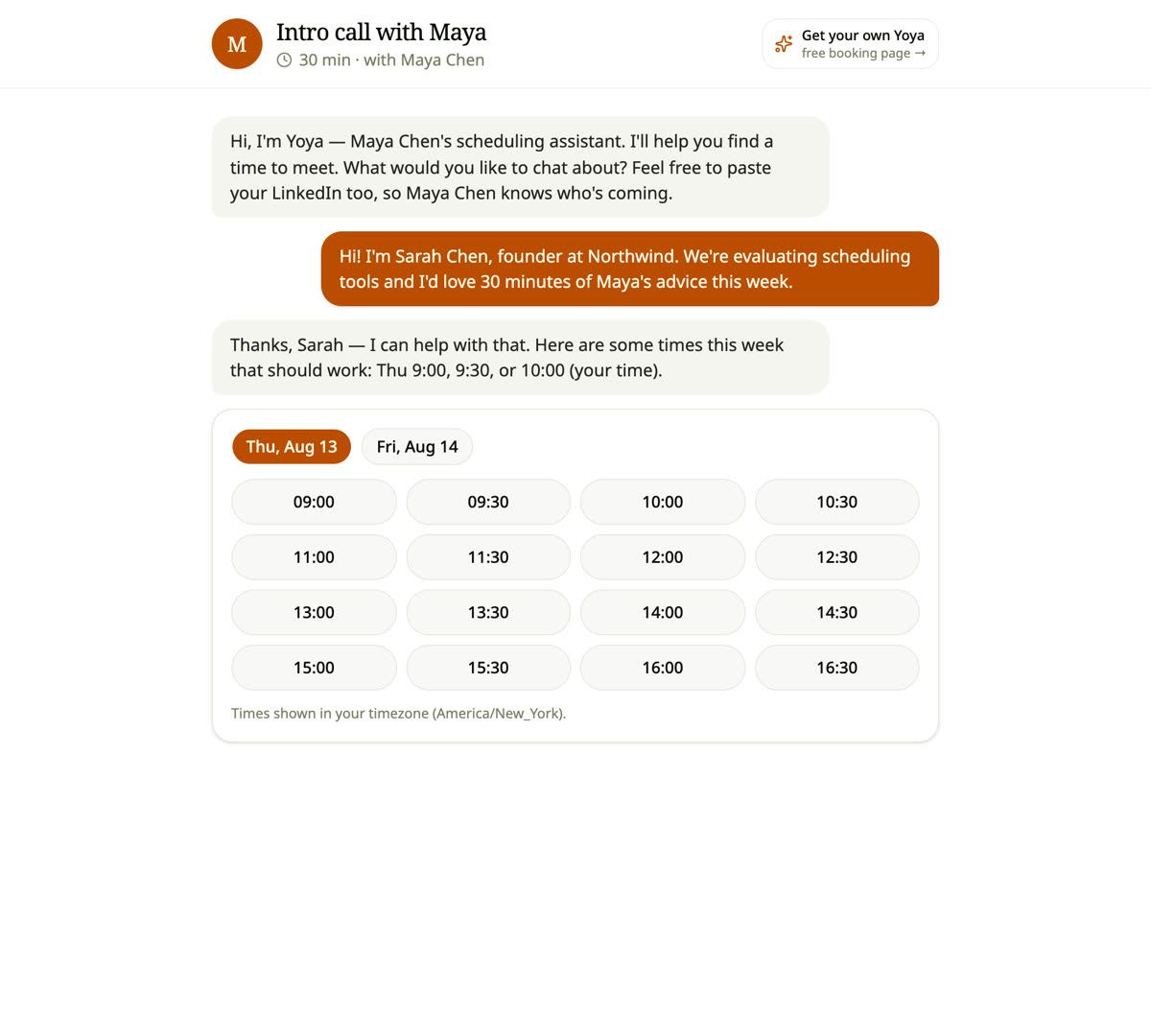
The guest opens a booking link and sees a composer that says "Message, or talk to Yoya…" with a microphone next to the send button. Pressing it opens a live voice session in the browser — WebRTC, no download, no phone number.
From there the conversation is ordinary speech. The guest says who they are and what they want; the assistant answers out loud and asks what it still needs. When it has enough, it offers times. Those times are spoken, and they are also the same real, currently-open times the text flow would offer, resolved into the guest's timezone.

The part worth noticing is what the voice layer does not do. It does not decide when the host is free, and it cannot invent a time to be agreeable. Speech is an input mode wrapped around the same booking core the typed conversation uses: availability is recomputed server-side, the assistant can only offer identifiers the server issued, and the final write is re-validated against a live calendar read. A voice booking and a typed booking produce the same record, the same calendar invite, and the same written brief.
That is a deliberate architectural choice. Bolting a voice bot onto a calendar as a separate system is how you end up with two sources of truth and a double-booking.
Why speaking captures better context than a form
The strongest argument for voice is not speed, though it is faster. It is that people say more than they type.
A form asks "what is this meeting about?" and gets "intro call". The same person, talking, says: "We're hiring a founding designer, launching in October, and I want your read on portfolio depth and offer timing." Nobody types the second version into a text box. They say it without thinking, because speaking is how humans explain things and typing is how they minimise effort.
This is where a conversational booking link compounds. The host does not get a slot with a two-word label; they get a written brief assembled from what the guest actually said. Yoya writes that brief from the conversation and attaches it to the booking, so the host reads it before the call — the same thing it does for typed conversations, just from a richer source.
There is a second effect that is easy to miss. A guest who is talking will volunteer constraints they would never fill into a field — "I'm in Berlin so mornings your time are better", "I'd rather not do Zoom, can we do a call?". Those are the details that turn a booked slot into a meeting that actually happens.
Four languages, pinned at the start of the call
A guest whose first language is not English will type in English and speak in their own. Voice makes the language question unavoidable in a way text does not.
Yoya handles it by pinning the language when the session opens, using the guest's browser language, and holding the whole call in it. English, Chinese, Japanese and Spanish are supported, and the assistant's first spoken sentence is written in advance for each one so the greeting never arrives in the wrong language while the model catches up. Anything else falls back to English rather than guessing badly.
Pinning matters more than it sounds. A model that detects language per-utterance will drift mid-call, answer a Japanese question in English, and lose the guest. Deciding once, at the start, from a signal the browser already knows, is both more reliable and less work.
For a host taking calls from more than one country, this is the difference between a booking link that works everywhere and one that quietly only works for people who are comfortable in English.
What it costs, and why it's metered
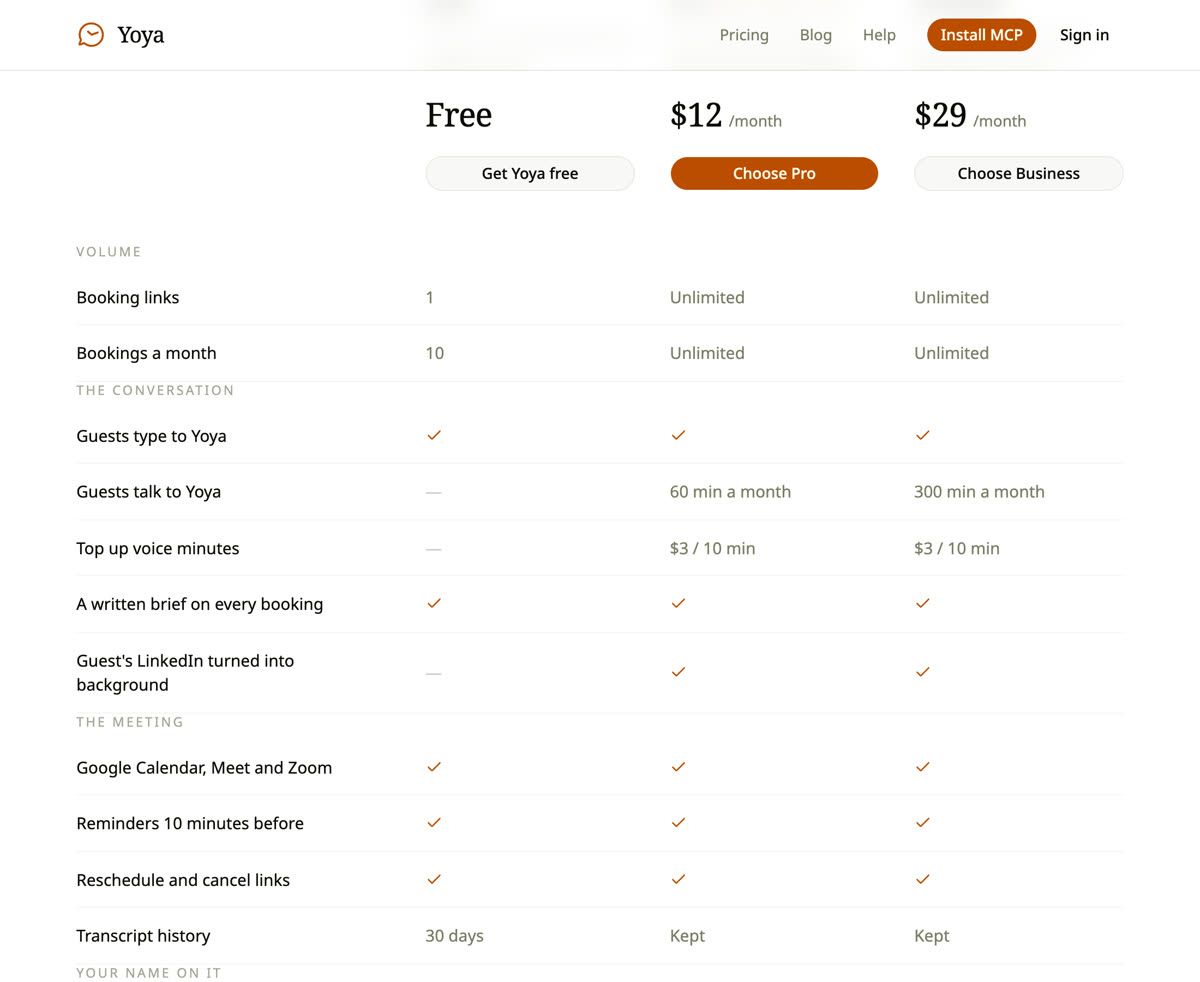
Voice is the one part of a scheduling assistant with a real marginal cost. Text conversations are cheap enough to give away — Yoya's free plan includes them. Speech synthesis and recognition are billed by the minute by the providers underneath, so a plan that offered unlimited voice would either be priced for the heaviest user or lose money on them.
So it is metered. Pro includes 60 minutes of voice booking a month, Business includes 300. A booking conversation typically runs three to five minutes, which puts Pro at roughly a dozen voice bookings a month and Business at around sixty.
Two design decisions follow from metering, and both are worth copying if you build something similar:
The mic disappears rather than failing. When a host is out of minutes, guests simply do not see the microphone — the page offers typing, the conversation carries on, and the booking still happens. A guest is never told that the person they are trying to meet has run out of an allowance. That is the host's problem, not the guest's, and surfacing it would cost the host the meeting.
Minutes you buy do not expire. If a host runs out mid-month, they can add 10 minutes for $3, and those minutes stay on the account until they are used. Monthly allowances reset; bought minutes are not an allowance, they are a purchase, and quietly deleting them on the first of the month would be taking money for something the host never got to use.
When voice is the wrong choice
It is worth being honest about the cases where a microphone does not help.
Open-plan offices and quiet carriages. A guest who cannot talk will not talk. This is exactly why the mic sits next to a text box rather than replacing it — the same conversation, two input modes, whichever suits the room.
Anything that needs exact strings. Email addresses, URLs and unusual names are miserable to dictate and easy to mis-transcribe. Yoya asks for those as fields rather than pretending speech is good at them.
Very short interactions. If a guest already knows they want Thursday at three, tapping Thursday at three is faster than explaining it.
The useful mental model is that voice wins when the guest has context to convey and their hands or eyes are busy, and loses when the interaction is a precise, short selection. A booking page that offers both, and writes the same brief either way, does not have to guess which situation the guest is in.
Frequently Asked Questions
Does the guest need to install anything to talk to Yoya?
No. Voice runs over WebRTC in the browser. The guest presses the microphone on the booking page and grants the browser's microphone permission — there is no app, no plugin, and no phone call.
Is this the same as an AI phone receptionist?
No. A receptionist answers a phone number and handles arbitrary calls. This is a microphone on a booking page: the guest is already looking at your link, and the conversation is scoped to arranging a meeting. That narrower scope is why it can be metered in minutes rather than priced per seat.
What languages does voice booking support?
English, Chinese, Japanese and Spanish. The language is chosen from the guest's browser at the start of the session and held for the whole call, with English as the fallback for anything else.
Do voice bookings produce the same brief as typed ones?
Yes — and usually a better one, because people explain more out loud than they type. The brief is written from the conversation either way and attached to the booking.
What happens when the host runs out of voice minutes?
The microphone stops being offered on that host's page. Guests can still book by typing, and nothing tells them anything ran out. The host can add 10 minutes for $3 at any time, and bought minutes do not expire.
Can voice booking double-book me?
No. Speech is only an input mode. Availability is recomputed from your live calendar on every turn, the assistant can only offer times the server issued, and the final booking is re-validated with a database constraint that makes two confirmed bookings in one slot impossible.
Is voice available on the free plan?
No. The free plan covers text conversations, one booking link and ten bookings a month. Voice starts on Pro at $12 a month with 60 minutes included.
Try it
Voice booking is one of those things that reads as a gimmick and lands as obvious the first time you use it walking down a street. The quickest way to judge it is to open a booking page, press the microphone, and say what you want.
Yoya is free to start — one link, ten bookings a month, no card — and voice is included from Pro upward with 60 minutes a month, topped up in 10-minute packs when you need more. The full breakdown is on pricing.
If you would rather your agent did the booking instead of your voice, that works too: every Yoya page is bookable over MCP, which is covered in How AI agents book meetings for you.