Add-to-Calendar Links: Yoya, AddEvent, and ICS Compared
The Yoya TeamSep 13, 20263 min read

You've agreed on a workshop time and want people to save it. An add-to-calendar link opens an event they can review and add to their calendar; an ICS file lets them import the details. If the time hasn't been agreed yet, send a booking link so they can choose a slot.
For a simple timed event, Yoya's free add-to-calendar link generator creates a Google Calendar link and an ICS download without an account. If you need a website button with a wider choice of calendar services or an event-sharing platform, consider AddEvent.
This comparison is published by Yoya and covers the features documented on September 13, 2026.
Pick the output before you pick the tool
| Output | What the recipient does | Use it for |
|---|---|---|
| Google Calendar link | Opens an event draft, reviews it, and saves it | An audience that uses Google Calendar |
| ICS file | Imports event details into a compatible calendar app | Sharing a single event across calendar apps |
| AddEvent button or links | Chooses a supported calendar destination | A website or email campaign with mixed calendar preferences |
| Booking link | Chooses an available appointment time | A consultation or discovery call that isn't scheduled yet |
Saving an event is not evidence that someone RSVP'd. If you need an attendance list, use a registration or invitation workflow that collects responses.
Yoya or AddEvent?
Yoya's generator is deliberately small. Enter a title, date, time zone, start time, duration, and any location or description. Then copy the Google Calendar link or download the ICS file. It supports timed, single events and runs locally in the browser.
AddEvent offers website buttons, email links, event pages, and several calendar destinations. Its documented setup starts with an account. The free Hobby offer currently lists 100 event-adds per month; review the live limits before choosing a plan. Its guide also distinguishes website JavaScript buttons from the plain links used in email. Source: AddEvent's button guide.
We'd use Yoya for an occasional fixed-time event when a link or file is enough. We'd look at AddEvent when an embedded calendar picker and managed event-sharing workflow are part of the requirement. Yoya's free tool doesn't include those capabilities.
What happens when the time changes?
Suppose you publish a calendar link for a workshop, attendees save it, and you later move the workshop. Changing your original link does not reach back into every saved copy.
Yoya's exports are snapshots. Send the corrected details and explain what changed; another import may create a duplicate. Google likewise notes that imported events don't remain synchronized with their original source. Source: Google Calendar's import guide.
AddEvent also distinguishes saved single events from subscription calendars that can receive updates. If updates are central to the event, evaluate that kind of subscription or a formal calendar invitation workflow before sharing the first link. Source: AddEvent's update explanation.
An example with an explicit time zone
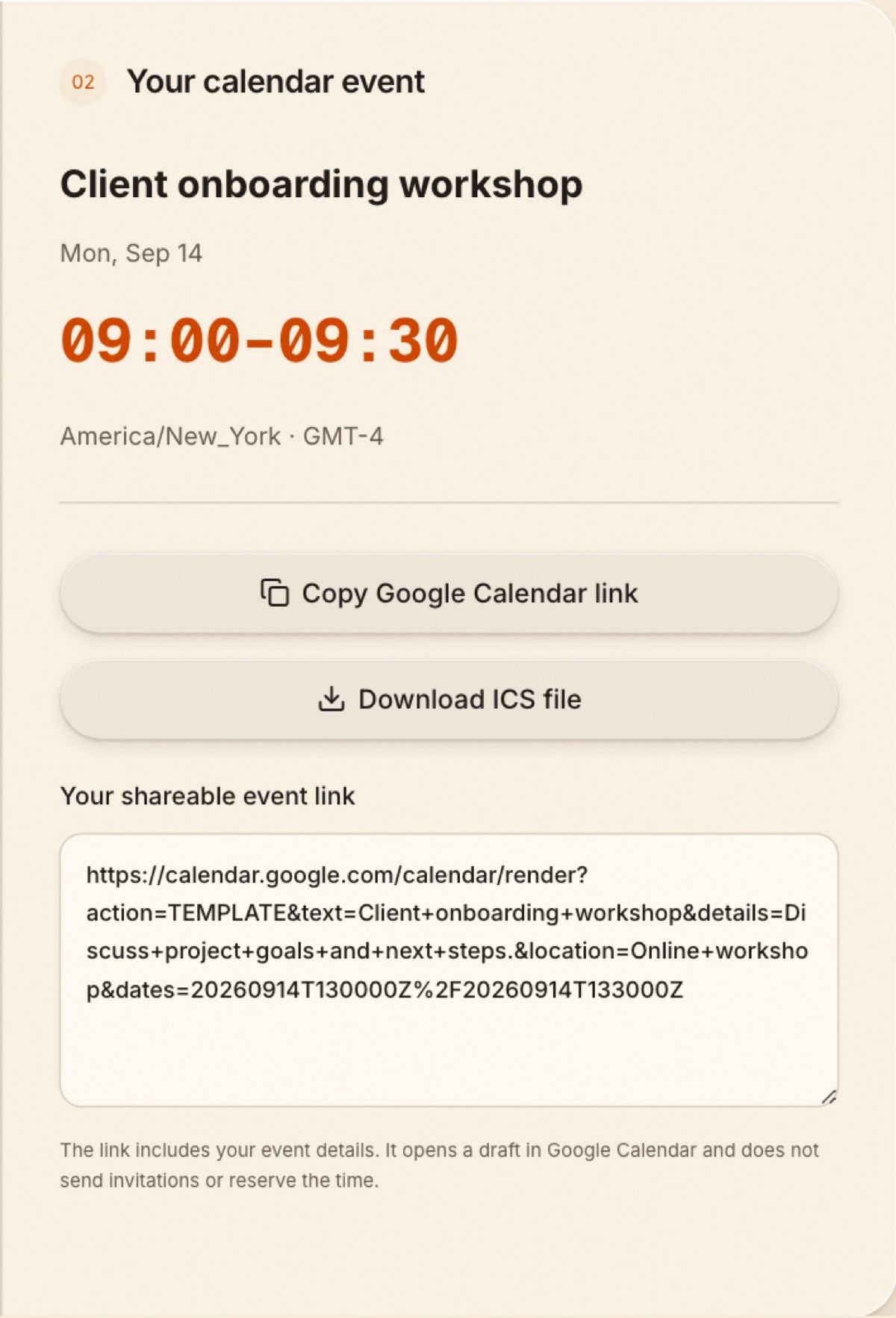
A 30-minute session on September 14, 2026, starting at 09:00 in New York corresponds to 13:00–13:30 UTC. A calendar set to London displays 14:00–14:30 that day.
In Yoya, enter ‘Client onboarding workshop,’ choose September 14, 2026, set the start to 09:00 and the duration to 30 minutes, then select New York's time zone. Enter the local New York time, not its UTC equivalent.
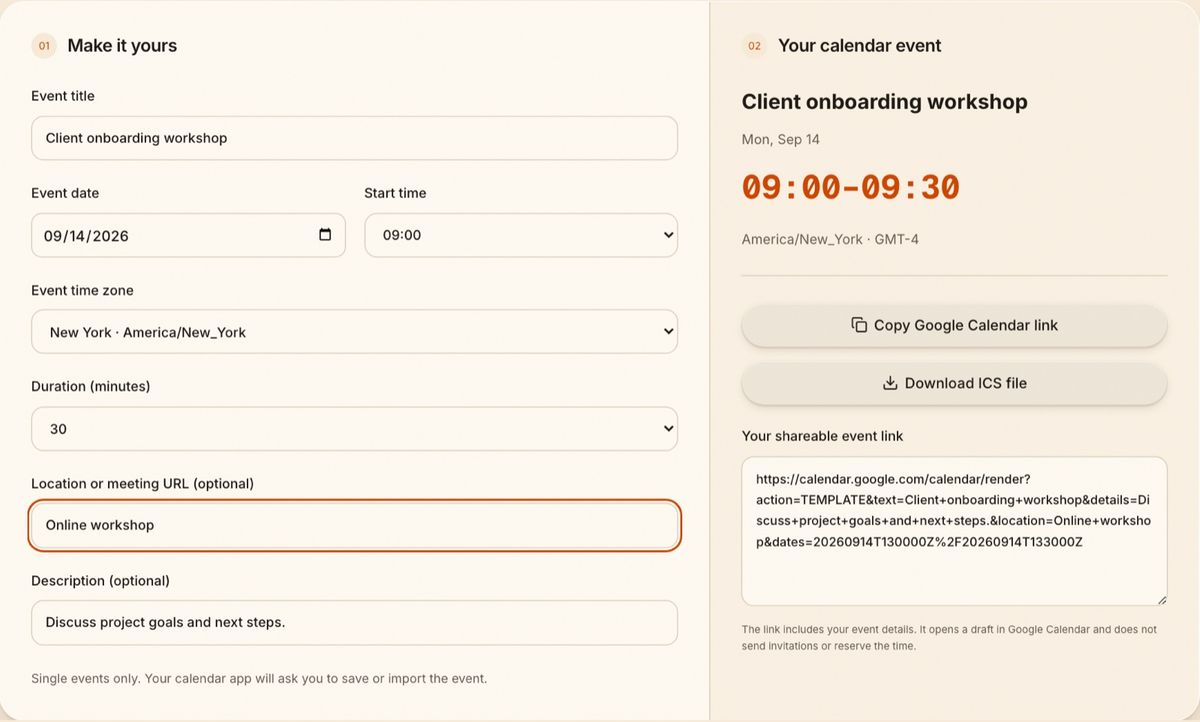
Check the event summary before copying the Google Calendar link or downloading the ICS file. If you haven't agreed on a time yet, first use the time zone meeting planner.
During a seasonal clock change, some local times happen twice and others don't happen at all. Yoya asks you to resolve a repeated hour and won't export a skipped local time. That check is useful, but it cannot tell you whether your audience is free.
Put the right link in the email
For an agreed event, write “Save this event to your calendar.” For an unscheduled call, write “Choose a time that works for you.” The meeting invitation templates cover both cases.
Keep private information out of a broadly shared calendar link. The Google Calendar URL contains the event details you enter, and Google receives those details when the link is opened. The event's location should be a meeting link or address you intend the recipients to see.
Does Yoya's generator send invitations?
No. It creates a link or file. It doesn't send email, reserve a time, or track attendance.
Does the ICS download work with Outlook and Apple Calendar?
ICS is supported by those calendar apps, though import steps and behavior vary. Check the title, date, and local time after importing a sample event.
What if guests need to choose a time themselves?
Use a booking page instead. Yoya's conversational scheduling guide explains how a guest can choose a time and give the host context during booking.