Meeting Request Email: 5 Templates to Copy (With Subject Lines)
The Yoya TeamNov 16, 20264 min read
A good meeting request email answers three questions before the reader has to ask: what the meeting is about, how long it will take, and when it could happen. Say why you're asking them in particular, offer two or three times or a booking link, and make it easy to say yes in one reply.
Copy the templates below and replace the bracketed fields. To build a draft from your own details, use Yoya's free meeting invitation email generator.
1. A meeting request to a client
Subject: Meeting request: [topic]
Hi [Name],
I'd like to set up a [30-minute] call to go over [topic] and agree on next steps.
Would [day, time] or [day, time] ([time zone]) work for you? If neither does, you can pick a time here: [booking link].
I'll send a short agenda once we have a time.
Thanks,
[Your name]
Give the length and the purpose in the first line. A client is more likely to accept a meeting when they can see what it costs them and what they get from it.
2. A meeting request to a colleague
Subject: 20 minutes on [topic] this week?
Hi [Name],
Do you have 20 minutes this week to talk through [topic]? I'd like your view on [specific question] before [deadline or event].
I'm free [day, time] or [day, time]. If it's easier, pick any open slot on my calendar.
Thanks,
[Your name]
With a colleague, name the exact question. Sometimes the answer comes back by email and you don't need the meeting at all.
3. A meeting request to someone senior
Subject: Request for a short meeting about [topic]
Dear [Name],
I'm [your name], [your role] on [team or company]. I'm writing to ask for [15 minutes] of your time to discuss [topic].
I'm asking you because [specific reason, for example your work on the pricing review]. I've put a short summary below so you can decide whether a meeting is worthwhile.
I can work around your schedule. If it's more convenient, I'm glad to coordinate with your assistant.
Thank you for considering it.
Best regards,
[Your name]
Ask for less time than you think you need, and let them choose when. The more senior the person, the more the email should do the work of the first five minutes.
4. A meeting request to someone you haven't met
Subject: [Mutual contact or shared context]: a quick call about [topic]?
Hi [Name],
[One line on how you found them, for example: I read your article on onboarding and shared it with my team.]
I'm working on [one-line context] and would value [15 to 20 minutes] of your perspective on [specific question].
If you're open to it, here's my calendar: [booking link]. If now isn't a good time, no problem at all.
Thanks,
[Your name]
Give them an easy way to say no. People are more willing to say yes when the request doesn't feel like pressure.
5. A follow-up when there's no reply
Subject: Re: [original subject]
Hi [Name],
I wanted to follow up on my note below about [topic]. I know your schedule is full.
Would a [15-minute] call on [day] or [day] work? If the timing isn't right, just say so and I'll check back [next month].
Thanks,
[Your name]
Reply in the same thread so the context is right there. Wait three to five working days, follow up once or twice, then leave it.
What subject line should I use?
- Meeting request: Q1 rollout plan
- 20 minutes on the launch checklist this week?
- Request for a short meeting about the pricing review
- Introduced by Dana: a quick call about onboarding?
- Can we meet Thursday about the renewal?
Name the topic and, if you can, the time you're asking for. "Meeting request" alone tells the reader nothing, and "Quick question" hides the fact that you're asking for a meeting.
Write it with the free generator
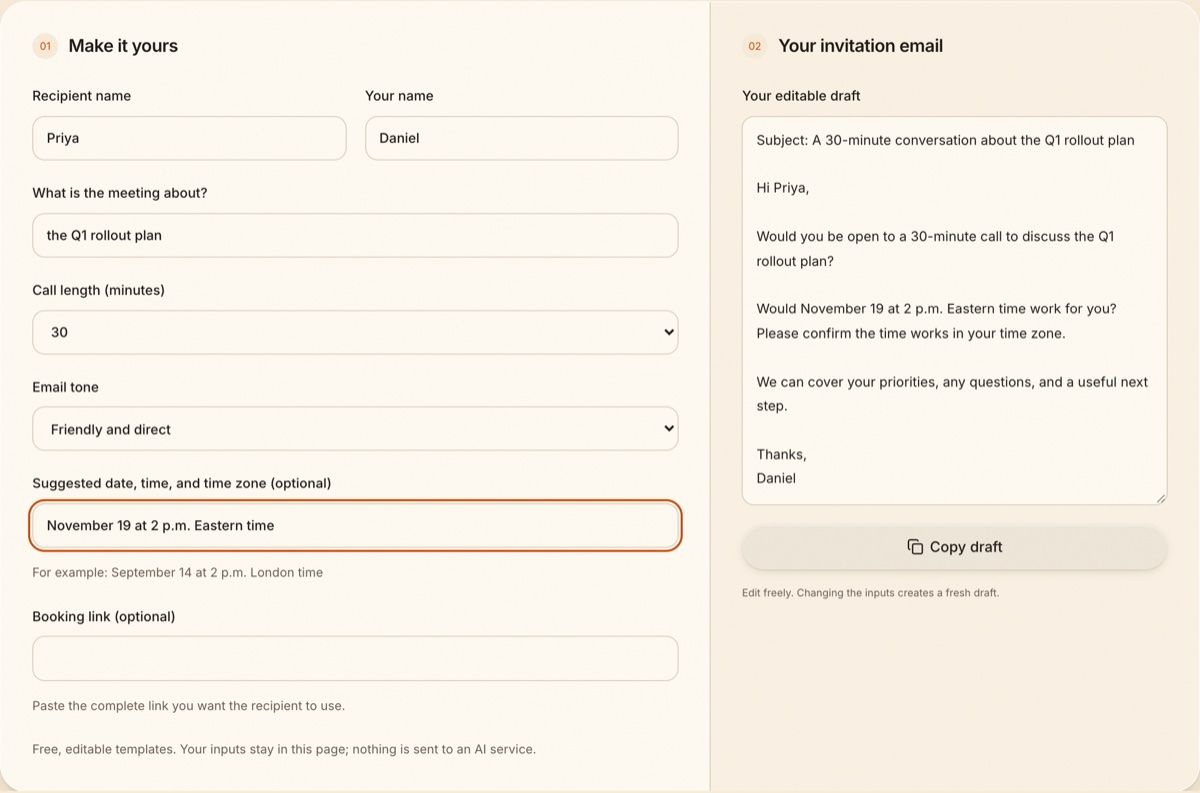
Add the recipient, the topic, the call length and a suggested time, and the generator writes the request:
Switch to the Formal tone and add a booking link, and the same request changes to match:
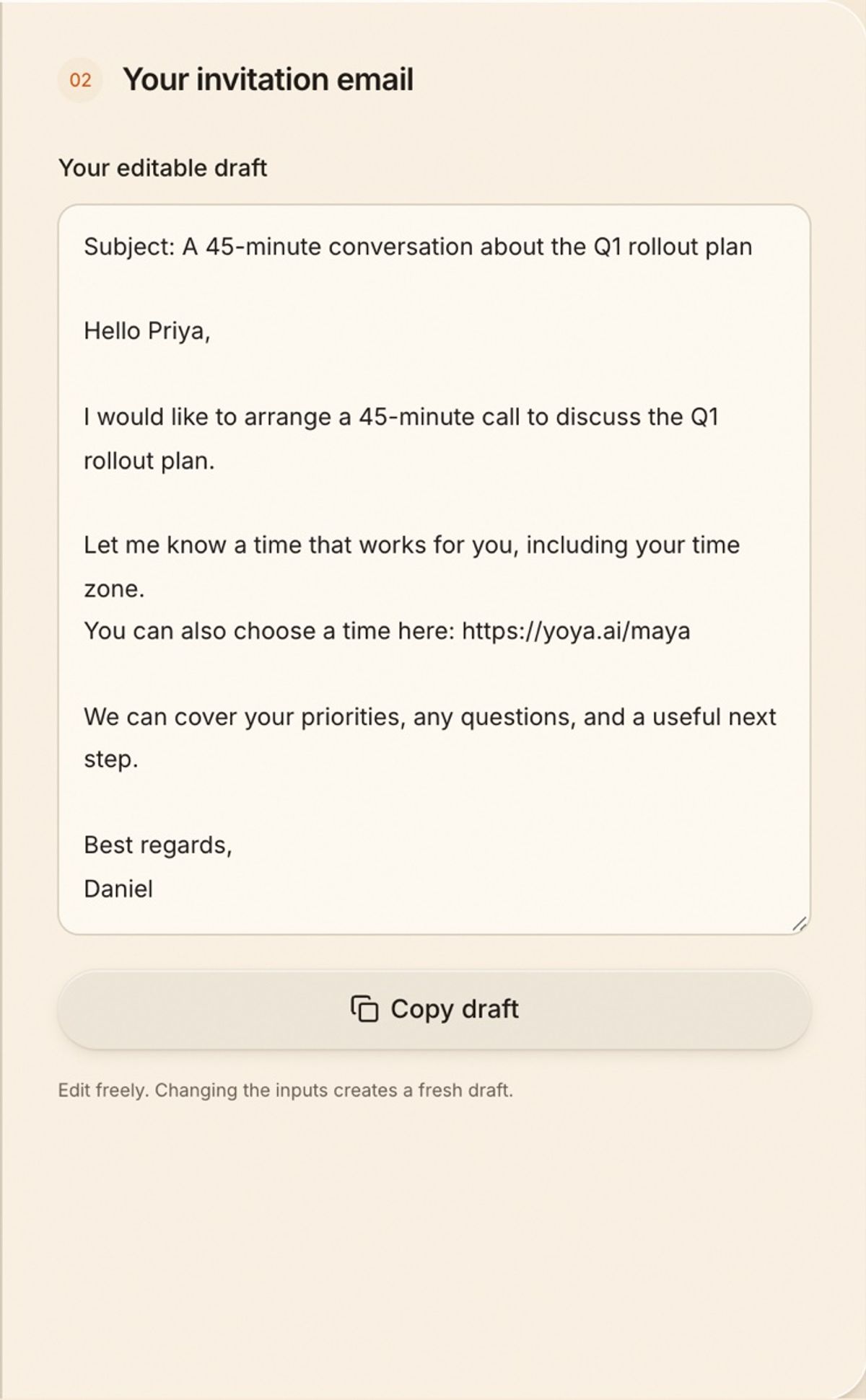
The draft stays editable, and it never invents a time you didn't enter. Try the meeting invitation email generator, or see more wording in these meeting invitation email templates for client calls.
After they say yes
Once someone agrees, the request turns into a confirmation, a reminder, and sometimes a change of plans. If the link in your email is a Yoya booking page, that part is handled when the guest books: Yoya sends the confirmation with a calendar invite, sends reminder emails before the meeting, and gives the guest their own link to reschedule or cancel.
If you're arranging it by hand, these meeting confirmation email samples and meeting reminder email templates cover the next two emails, and these cancel meeting email samples cover the one you hope not to send.
FAQ
How do you ask for a meeting politely via email?
Say who you are if they don't know you, explain what you'd like to discuss and why you're asking them, give the length, and offer two or three times or a booking link. Thank them, and make it easy to decline.
What is a good subject line for a meeting request email?
One that names the topic and the ask, such as "Meeting request: Q1 rollout plan" or "20 minutes on the launch checklist this week?" Avoid vague subjects like "Quick question."
How long should a meeting request email be?
Short. Three to six sentences is usually enough: the purpose, the length, the proposed times and a thank you. Put any background below your signature or in an attachment.