Follow-Up Email After a Meeting: 5 Templates With Recaps and Next Steps
The Yoya TeamNov 22, 20264 min read
Need one written for your own meeting? The free Meeting Follow-Up Email Generator drafts it from your details. No signup.
A follow-up email after a meeting does one job: it turns what people said into what people will do. Thank them for their time, write down the two or three things that were decided, and list the next steps with a name and a date next to each one.
Send it the same day. By the next week, everyone remembers the meeting a little differently, and the email becomes the version that counts. If you'd rather fill in a form than edit a template, Yoya's free meeting follow-up email generator builds the recap from your own notes.
1. A recap with next steps
Subject: Follow-up: [meeting name] on [day]
Hi all,
Thanks for your time today. Here's a quick recap so we're working from the same notes.
What we decided:
- [Decision one]
- [Decision two]
Next steps:
- [Name] will [task] by [date]
- [Name] will [task] by [date]
If I've missed or misstated anything, reply here and I'll update it.
Thanks,
[Your name]
Keep decisions and next steps in separate lists. People skim for their own name, and a task buried in a paragraph is a task nobody owns.
2. A follow-up to a client
Subject: Next steps from today's call
Hi [Name],
Thank you for meeting with us today. It was helpful to hear [one specific thing they told you].
To summarize where we landed:
- [What you agreed on]
- [Any change to scope, budget or timing]
From our side, I'll send [deliverable] by [date]. From yours, could you [what you need from them] by [date]?
Happy to set up a short call once you've had a chance to review.
Best regards,
[Your name]
Ask for the one thing you need from the client in its own sentence, with a date. "Let us know your thoughts" gets a reply weeks later; "Could you send the brand files by Thursday?" gets files.
3. After a sales or discovery call
Subject: [Their company] + [your company]: notes and next step
Hi [Name],
Thanks for walking me through how [their team] handles [process] today. The part that stood out was [the pain they described, in their words].
Based on that, I think the right next step is [a demo for their team / a short proposal / a pilot]. I've held [day, time, time zone] for it, or you can pick another time here: [booking link].
I've attached [resource] that covers [the question they asked].
Best,
[Your name]
Repeat their problem in their own words before you mention your product. It shows you listened, and it's the line they'll forward to whoever signs off.
4. After a networking meeting
Subject: Great to meet you, [Name]
Hi [Name],
Thanks for making the time to meet [yesterday / at the event]. I really enjoyed hearing about [something they shared].
As promised, here's [the article, intro or resource you mentioned].
If it's useful, I'd be glad to [return the favor / make an introduction to someone]. Either way, let's stay in touch.
Best,
[Your name]
A networking follow-up works when it delivers the thing you promised during the conversation. If you didn't promise anything, a short thank-you email after a meeting is the better fit.
5. When the next steps have stalled
Subject: Re: Follow-up: [meeting name]
Hi [Name],
Quick check on the next steps from our [meeting] on [date]. I've [done your part, for example: sent the revised quote].
Is [their task] still on track for [date], or should we move it?
Thanks,
[Your name]
Reply in the original thread so the recap is right there. Lead with what you've already done, which makes the question about their part feel fair rather than pushy.
Follow-up email subject lines
- Follow-up: product review on Tuesday
- Next steps from today's call
- Recap and action items: Q1 planning
- Notes from our meeting on November 18
- Great to meet you, Priya
Name the meeting or the date. "Following up" on its own tells the reader nothing, and they can't find it later when they're looking for the decisions.
Draft it from your own notes
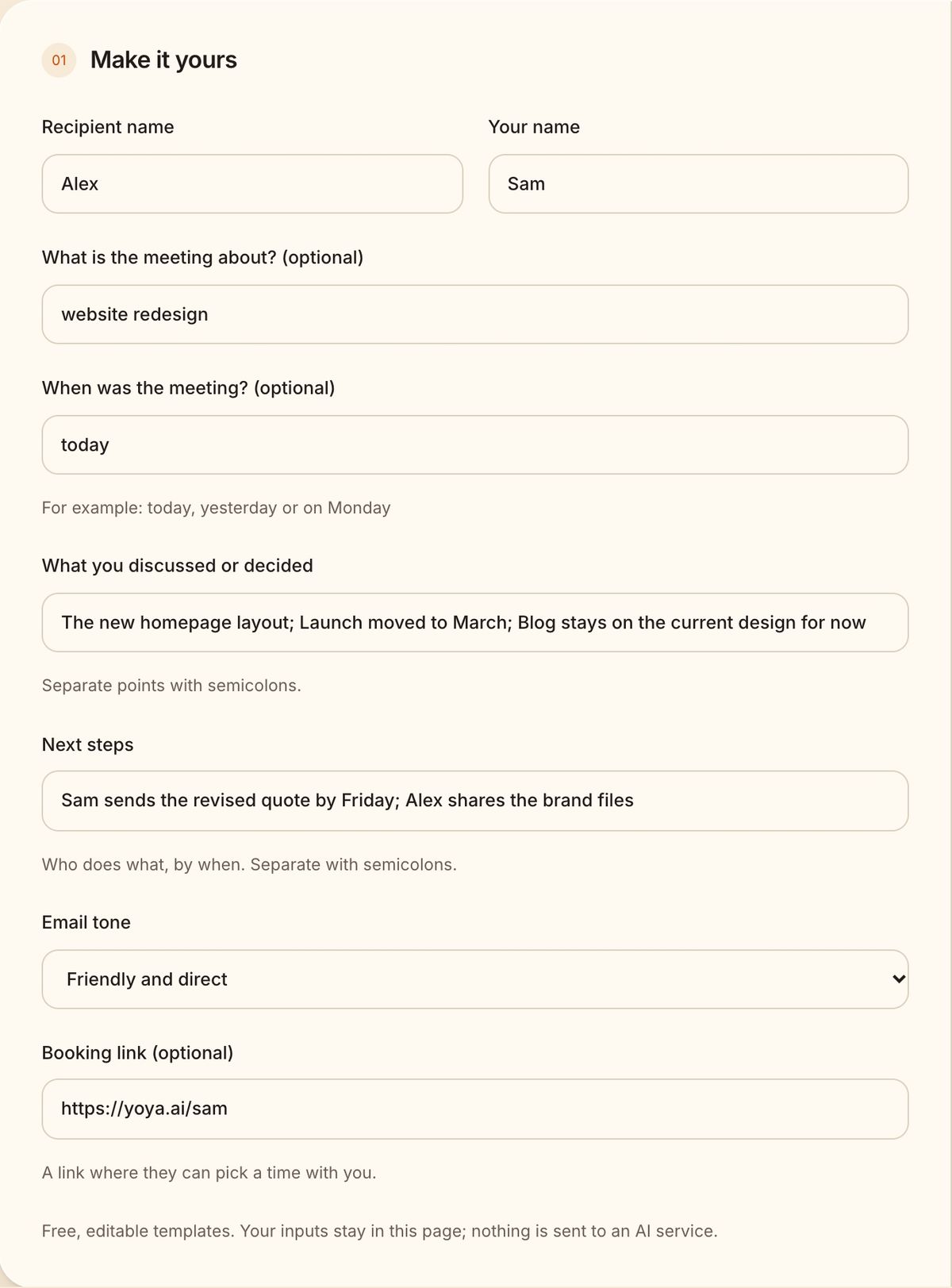
The free generator asks for the meeting, what was discussed and the next steps. Separate each point with a semicolon and it lays them out as two lists:
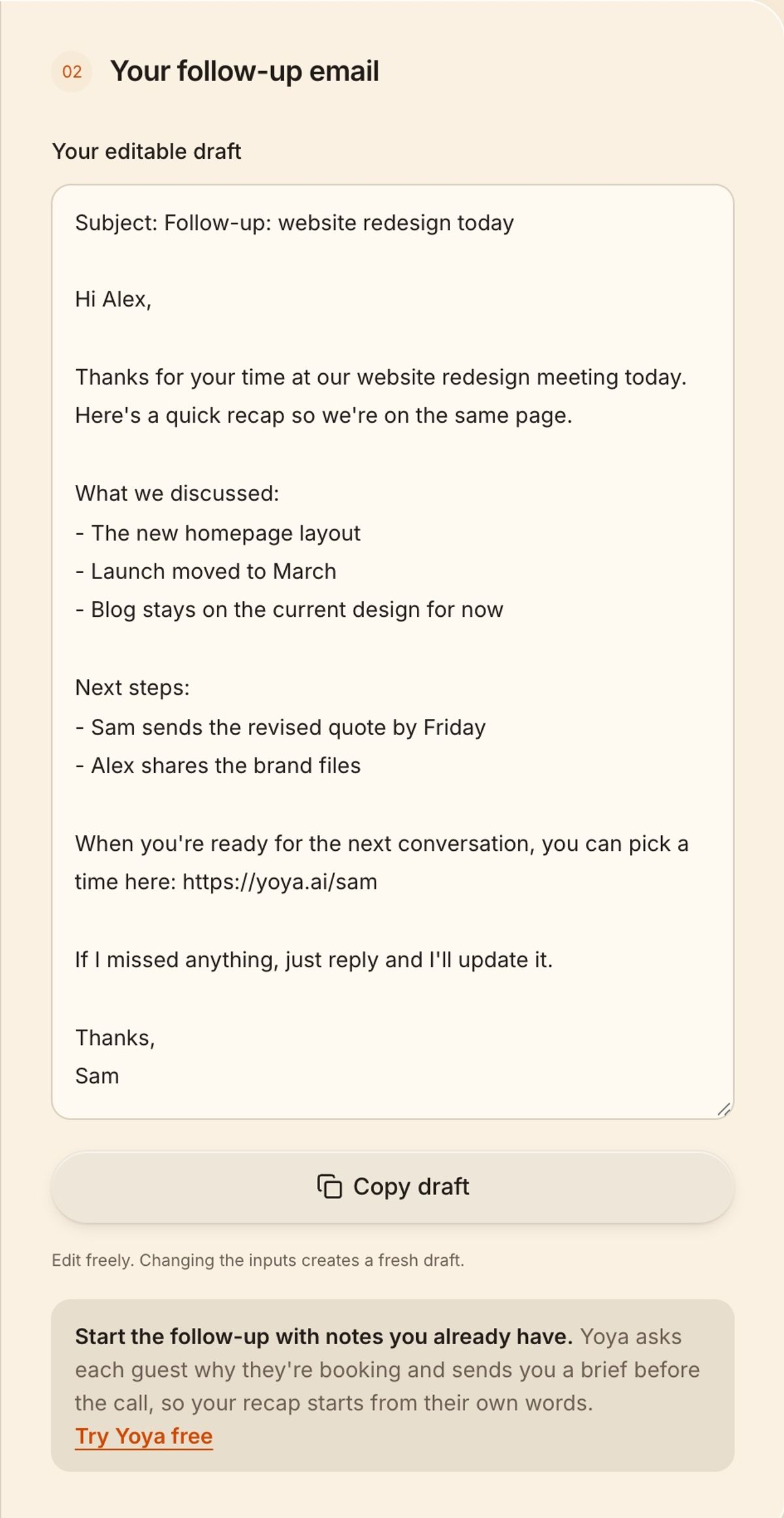
It leaves out anything you don't fill in, and only adds a booking link if you paste one:
The best recaps start before the meeting. Yoya is a booking link that chats with your guests before they book: it asks what they want to cover and puts the answer in a brief on your calendar event. You walk in knowing why they came, and your follow-up starts from their own words.
FAQ
How soon should you send a follow-up email after a meeting?
The same day, or the next morning at the latest. The sooner it arrives, the more likely everyone agrees with it.
What should a meeting follow-up email include?
A thank-you, the main points or decisions, next steps with an owner and a date, and how to reach you if something is wrong. Most good follow-ups fit on one screen.
What's the difference between a follow-up email and meeting minutes?
Minutes record what happened in the meeting. A follow-up email keeps only what people need to act on: decisions, owners and dates.
More meeting email templates
- Reschedule meeting email samples and postponement wording
- Meeting confirmation email samples, with replies
- Meeting reminder email templates for the day before and the hour before
- Cancel meeting email samples for short notice
- Meeting request email templates and subject lines
- Thank-you emails after a meeting, for clients, contacts and interviews
- Meeting agenda email templates with subject lines
- How to decline a meeting politely, with email samples
- Follow-up email when a meeting request gets no reply
- Interview scheduling email templates for every round
- No-show email templates and text messages for clients